Automatically translated from Dutch. Some wording may be inaccurate.
An example of such a file:
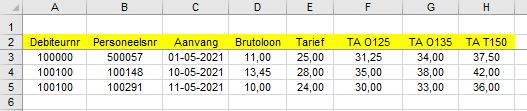
Regelneef identifies the data by the column names. The header row does not have to be in a fixed position. In this example it is row 1, but it could also start at row 6. Regelneef finds it automatically and expects the data immediately below it.
The order of the columns may vary. Unrecognised columns are ignored.
The following column names are required:
•Debiteurnr
•Personeelsnr
•Aanvang: the placement start date
•Brutoloon
•Tarief
Optional columns can be included for overtime or premium-hour rates. They use the following format:
[TA][Space][Hours type][Percentage]
•Hours type: O = overtime hours, T = premium hours
•Percentage: the percentage of the hourly wage in the placement.
This can contain 3 characters (for example '125', without decimals) or 6 characters ('125,00', with decimals)
Further requirements:
•An overtime rate column may not occur more than once.
•The same placement (the combination of debtor number, personnel number and start date) may not occur more than once.
The first worksheet is read. To use a different worksheet, name that worksheet 'regelneef'.