Regelneef update 8.4.0
New module: Statistics
Via File->Statistics, you can access a new module that allows you to visualise data in a graph for a period of your choice. Navigating to previous or subsequent periods updates the graph immediately.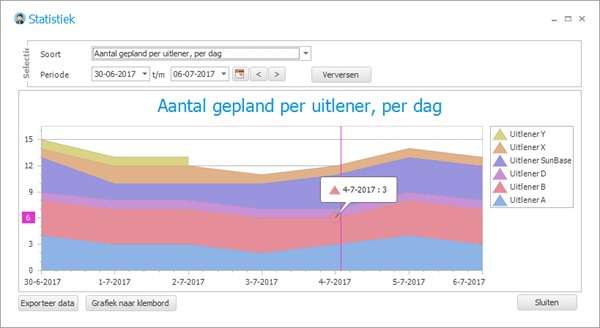
More types of statistics will be added in future versions; at present, the following planning-related items are available:
Number of client contacts by type, per week
Scheduled employees per client, per day
Number of people requested per request, per day
Scheduled employees per subcontractor, per day
The chart can be copied to the clipboard as an image so that it can be reused elsewhere.
The data can be exported to Excel.
Making calls from Regelneef
When making calls via VOIP on a computer, you can now also dial a number directly from Regelneef with a simple click of a button. This works when using systems such as KPN ÉÉN or Hipin. In Regelneef’s telephone fields, an additional button is displayed for this purpose, next to the SMS button. Pressing this button dials the relevant number.
This can be easily enabled centrally by going to Maintenance->Settings, on the General tab, and ticking this option.
Day planning: copying and planning ahead
In the day planner, you can edit the individual working days within a placement, including, if desired, the working times and planned hours. This module has been significantly improved internally in this version. There are also now new options for quick forward planning: by week or by day.
Copying by week
Using the new ‘Copy’ link, the planning data for the relevant placements is stored in the clipboard, after which it can be pasted into another week in one go. For example, by going to the following week and clicking ‘Paste’ there.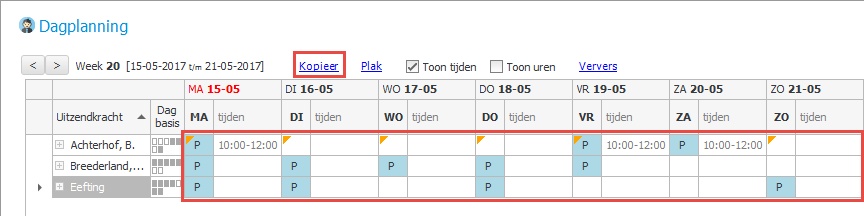
Copying by day
It is also possible to plan on a daily basis, for multiple placements at once. This is done using the C and V buttons to copy and paste the day. In the example below, the C button was pressed in the Mon column, and then the V button was pressed in the Tue column.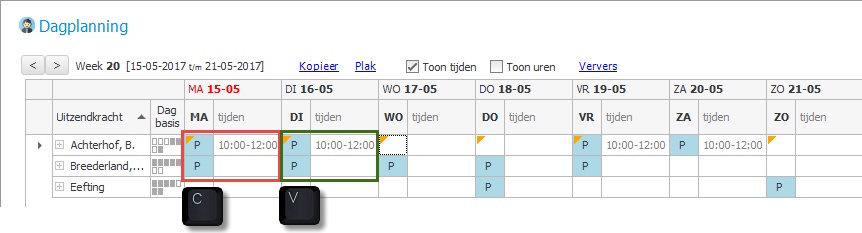
Employee planboard
The ‘Day planner’ button now automatically opens all placements from the list shown for that day. This allows you to update the entire group of people at once.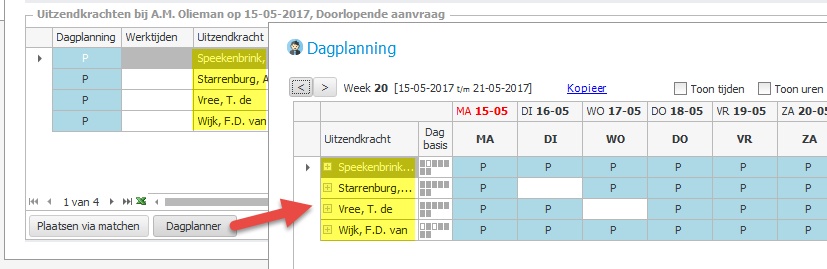
Employees
Employee QR codes on more documents
The following document types now also support the generation of QR codes, enabling the employee and the document type to be identified via a code:
Car usage
Accommodation usage
Absence
Goods
Miscellaneous imports
If a certificate number is longer than 20 characters, the right-hand portion is used.
In the detail screen, the discipline can now also be selected via the underlying table.
Clients
New field ‘Known through’
This new field allows you to record how a client or prospect came into contact with the company. There is an underlying table which can be managed via Client->Tables.
The field can also be made visible in lists under Client Overview. To enable this new field to be filled in quickly for multiple clients at once, it has also been added to the ‘Multi-edit’ function under Client Overview.
Entering contacts for multiple clients at once
It is now possible to add a contact event to multiple clients in one go. This feature is available in:
Client Overview (via the menu behind the ‘Bulk Edit’ button)
Employee planlist (via the menu behind the ‘Client’ button)
Search by telephone number
Searching by telephone number in the Client Overview now searches all telephone numbers associated with contacts and contact persons.
Requests
New for contacts: contact type
A contact type can now be specified for contacts via a drop-down list.
This can be used, for example, to distinguish between contacts with the client and those relating to recruitment and selection.
The contact types for requests are listed in a new table, which can, of course, be customised. This can be done via the menu: Client -> Tables -> Request contact types.
On the Candidates tab, the affiliate of the relevant employee is now also displayed in a column.
Cars
Mileage and refuelling: calculation of differences and totals
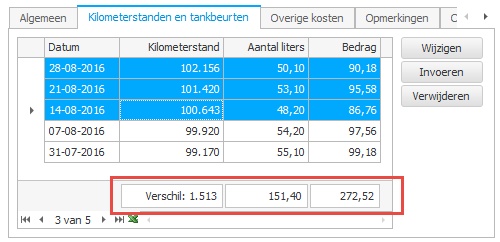
A total row has been added to this tab for each vehicle, and it is now possible to select multiple rows. The total row displays the following information:
The difference in kilometres between the highest and lowest readings in the selected rows
The total number of litres refuelled; for multiple selected rows, this applies only to those rows
The total refuelling cost; if multiple lines are selected, this applies only to those lines
Miscellaneous
Selecting accommodation by postcode
In the Accommodation Overview, a selection option based on postcode and radius has been added, similar to how this works for clients and employees.
Other solutions and improvements
New columns available in overviews:
- Employee planlist / planboard: street, house number, suffix, telephone 1, telephone 2 and telephone 3
- Employee overview: initials, street, house number and suffix
- Accommodation planlist: contract start date, contract end date, contract termination date and deposit paidPlacement export to Freepack assignments:
- Now respects the employee’s Pay reservations directly setting.
- Includes the employee number as well as BSN.Improved graphical display of the menu toolbar: these buttons now look equally sleek across all colour themes.
In the cloud version, it was not always possible to sort by columns containing amounts or hours. This has been resolved.
Alerts for an employee’s additional check dates now also take into account the selected affiliatees in the alert.
When changing a password, there is no longer a maximum length restriction on the new password.
When pasting files from Outlook, an error message could occur if the file name contained certain special characters. This has been rectified.
