Regelneef update 8.6.0
Changes in accordance with the GDPR
Applicant status and alerts
Under the GDPR, it is important to keep a close track of registered individuals. After all, their data may only be retained for a limited period. For this reason, a ‘Applicant’ indicator (tick box) has now been added for each employee. The following changes have been made in relation to this new field:
In the Employee overview, a tick box has been added to retrieve all applicants at once
In the Employee overview, the ‘Bulk Edit’ function can now also be used to update the ‘Applicant’ field in batches
A new column is available for this field in the Employee overview
When assigning a worker, a notification is displayed if the person is still registered as an applicant
The existing field showing the user who registered the candidate has been renamed to ‘Registered by’
Register employees without a placement as applicants
An option has been added to mark everyone as an applicant in one go if, according to the system, they have never been placed and are not hidden or blocked.
This option has been added to Maintenance->Settings, in the ‘Handy’ tab.
Flag applicants
From now on, a notification will be triggered for applicants who were registered four weeks ago. This period can be adjusted, if you routinely obtain consent to retain the data for one year, or the maximum period of two years. The period can be set centrally via Maintenance->Settings, on the Alerts tab.
An employee’s last active date
From now on, Regelneef automatically records in a separate field the last date on which an employee was active. This takes into account the day planning within the relevant placements for an employee.
It is now possible to display this date in the Employee overview. A ‘Last active date’ column is available for this purpose via the list definitions.
The last active date is relevant for GDPR compliance. Once a person is no longer active, data may only be retained for a limited period. Via the Employee overview, it is possible to select individuals who were active up to a specific date. In addition, a warning has been added for this purpose.
Alert regarding data retention period for inactive employees
Based on the ‘Last active’ field, a new alert has also been added, which flags three specific points in time: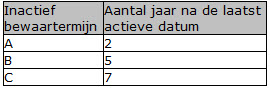
Search by BSN
Searching by BSN number is not permitted under the new privacy regulations and has therefore been removed.
Merging documents with Excel
It is now possible to populate existing Excel documents via Regelneef!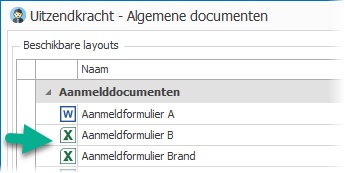
Why
Of course, it has long been possible to write data to a new Excel file. But now it is also possible to write data to an existing Excel file. This opens up all sorts of possibilities, for example:
Automatically filling in third-party Excel documents, such as a registration form.
Complete freedom in how the data is presented in Excel. You decide on the layout yourself.
All of Excel’s features are available, such as formulas, charts, pivot tables, etc. Do you have your own specialised cost calculation in Excel? Regelneef can now generate it directly.
How to use it
It forms part of the layout system, which is accessible in many places via the ‘Documents’ button.
The layout screen can now display Excel documents as well as Word documents. By clicking ‘Start’, a user can then export the selected data to the Excel file. Features such as emailing, conversion to PDF or electronic signing are also available for the merged Excel documents.
How to maintain
In the layout screen, ‘Show maintenance options’ must be ticked. Click New, and select Excel as the type. A ‘Merge Definition’ button will then appear. This opens a screen where you can specify which data should be written to which cell. The operation of this screen is described in the help function. Once the definition has been completed, it can be saved by clicking ‘OK’. Regelneef will then ask you to specify the Excel (xlsx) layout file to be populated. The file can always be replaced using the ‘Import’ button.
It therefore works in a similar way to Regelneef’s Word mail merge, but there are, of course, differences:
The mail merge information is not embedded within the file itself, as the mail merge codes are in Word, but is contained in a separate definition. This is particularly useful for third-party files: if a new version is released, the old one can simply be replaced, whilst the mail merge definition remains intact.
When merging multiple records, that data is repeated as rows in the Excel file. The Excel file as a whole is not repeated for each record, as is the case with Word documents.
The layout screen has been updated in terms of its display. The icon is now shown on the far left, making it look clearer.
Excel mail merge is available in most places where Word mail merge is also possible.
More flexible evaluations
It is now also possible to create an evaluation based on an employee. Until now, this was only possible from a placement. This is particularly useful for companies that wish to record evaluations without having any placements in the system.
Entering via an employee is possible via a new drop-down menu to the right of the ‘New’ button. A selection screen for employees will then appear, in which multiple staff members can be selected if required.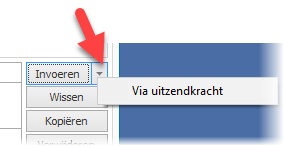
Client, discipline and location can be edited
When using this feature, the relevant client and discipline – which are normally taken from a placement – must be entered in the evaluation. This has been made possible: a drop-down list of clients and disciplines now appears in these columns, based on the characters entered. The location column can now also be edited.
These editing options are also available for evaluations created from a placement.
Entry from a placement
After entering an evaluation from a placement, you are now immediately prompted to open the evaluation screen for the relevant placement(s).
Editing a document before sending it by email
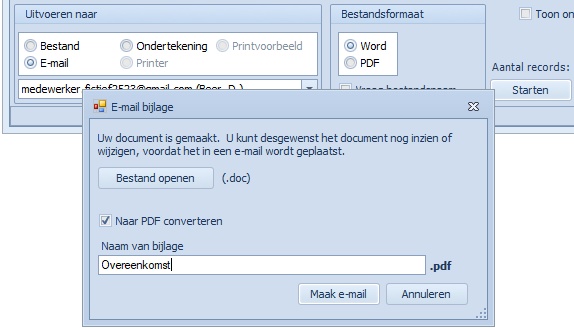
From the layout screen, you can quickly generate a document and insert it into an email. Regelneef now displays additional options when starting a Word layout for email:
The generated document can first be opened – and edited if required –
It is possible to change the name of the file in the email
Copying weeksheets
In the planlist, it is now possible to create a weeksheet for a group of placements in one go, with the hours filled in based on an existing weeksheet of your choice.
The normal hours, overtime hours, surcharge hours and time-off-in-lieu reservation are taken from the existing weeksheet.
For overtime and surcharge hours, however, the wage and rate percentages must exist in the placement for which the weeksheet is being created. A notification will be displayed if this is not the case.
The schedule is taken into account: no hours will be transferred for days on which a person is not scheduled.
You can use this new option from the employee planlist, via the ‘Fill automatically’ button (in the ‘Weeksheets’ section).
Miscellaneous
Deleting multiple employees at once
The ‘Delete’ button in the Employee overview now also works with multiple selected records. If a deleted employee still has a file folder, this will be reported after deletion.
Deleting electronic signing requests
It is now possible to delete multiple signing requests in one go.
Internet update with documentation
The Internet update is the system for updating the local Regelneef system (i.e. not the cloud version). A link has now been added to this screen which displays further information about the most recent changes. The link is only displayed when a new version is available.
LinkedIn button
News about Regelneef can also be read via LinkedIn. A button has been added for this purpose next to those for Twitter and Facebook. Following these is the easiest way to stay up to date with Regelneef news.
Proposals overview
A ‘Client’ button has been added here, allowing you to open the relevant client details directly.
Importing contact notes for employees
The import module now allows you to import longer text, which is then added as a contact memo for the imported employee. This provides extra flexibility for importing additional information
Format of Excel lists: XLSX
All output from Excel lists is now automatically in XLSX format.
Log
This new feature is available via the Maintenance->Log menu. The logbook displays informative messages about certain background processes. For example, if there is an automatic link to another system, events relating to this can be reviewed via the logbook. In future, certain specific actions, such as deleting a client, will also be logged.
ABU phase adjustment
Since November 2017, Phase B of the ABU has consisted of six periods rather than eight. Periods B-7 and B-8 have been discontinued and are therefore no longer visible in Regelneef. If any employees were still in B-7 or B-8, they were placed in Phase C following the Regelneef update.
You can check whether there were any employees in phase B-7 or B-8. To do this, go to Maintenance->Log, select the period in which this update took effect (if applicable) and click ‘Search’. If there were any employees with B-7 or B-8 status, this will be indicated by a notification of the type ‘ABU_FASE’.
Car benefit-in-kind
For a car, the percentage of the additional tax liability can be specified. This column is also available in the car planlist and the car planboard.
List definitions
It is now easier to widen the detail screen of a screen or Excel list definition
Changes to the name of a certificate are now correctly reflected in the employees list definitions and the planlist.
Added to all planlists and planboards: PESEL number.
Added to the Absence planlist: Languages and Disciplines.
Added to the Goods planlist: Subcontractor.
Added to the Employee overview: a large number of columns to the screen lists. These were already available in Excel.
The columns are:
Initials, Surname prefix, Surname, Country of Birth, Place of Birth, Country, Alternative country, File Folder, Account Type, Account holder, Account holder city, BIC code, Cash payment, Contract phase start, Contract phase end, File location, Email, Payroll tax credit, Net allowance, Passport valid until, Passport number, PESEL number, Driving licence, Driving licence valid until, Driving licence number, Telephone 1, Telephone 2, Telephone 3, Surplus wage, Residence permit, Residence permit valid until, Health insurer, Policy number, Languages.
Miscellaneous
Bulk editing of employees: the ‘Reason for registration’ field has been added here.
User level: filter options have been added to enable faster searching by part of the name of a rights option.
Hired-in staff man-day statements: a new merge field has been added to allow the total number of hours to be entered in documents.
Cloud version: all buttons used to open an employee’s details screen have been adjusted to prevent the screen from opening twice if a user accidentally double-clicks the button.
The overview of pending signature requests no longer experiences delays when dealing with large numbers.
An error message that occurred when opening weeksheet documents from the planlist has been resolved.
The name of a discipline in the discipline table can now contain more characters: up to 60.
The validation check no longer checks certificates for hidden subcontractors.
In merge codes, certain contract phase dates for an employee were not yet made available. This has been rectified.
When generating multiple documents at once, the header of one document no longer carries over into the next document.
In the Statistics module, the cursor now displays more information, making it clearer where certain data belongs.
