Regelneef 19.1
New version numbering
Numbering by year
From now on, Regelneef will be assigned a version number based on the year. The first version for 2019 is version 1, so the version number is 19.1. The next update will be 19.2. It is estimated that there will be 6 updates per year. The first version for the following year will be released as early as December.
Regular updates, including for non-cloud users
Regelneef cloud users have always automatically received new versions on a regular basis, but for non-cloud users, changes were previously ‘held back’ and usually released twice a year. This is now changing.
From now on, non-cloud users will also have immediate access to the latest version: changes will no longer be held back for a ‘major release’. Regelneef will automatically notify users when an update is available (on average six times a year). From now on, a notification will be issued via the website and other channels for every new version.
For various non-cloud customers, this version 19.1 is the first version since 8.6.0, and therefore still includes a summary of all changes since that major version.
Regelneef archive
From now on, the cloud version allows files to be stored within Regelneef itself: the Regelneef archive.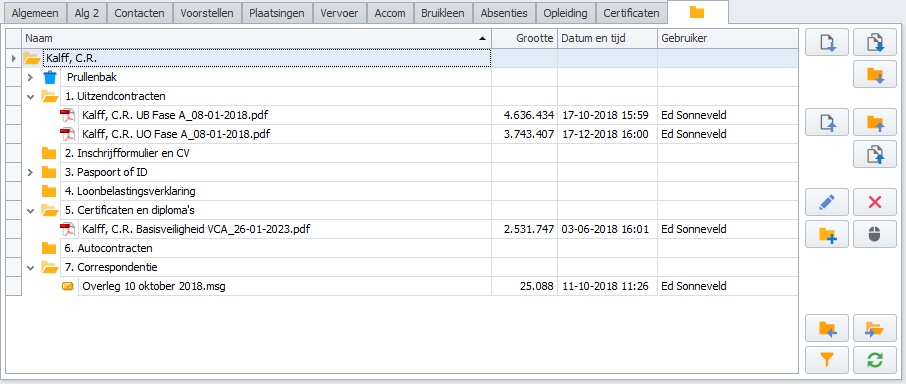
The Regelneef archive has been designed as a more comprehensive replacement for the existing archive system (which involved linking to a location on a shared drive).
Features of the Regelneef archive
It offers fully integrated centralised document storage.
No more separate links to external shared (cloud) folders are required.
Document access control can be managed entirely via Regelneef.
Every record automatically has an archive into which documents can be placed.
This applies to employees, clients, accommodation, vehicles, subcontractors, intermediaries and equipment.
It works with all parts of Regelneef, such as the scan distributor, the import of employees or the display of the archive for multiple employees at the same time.
Documents can also be accessed via the Regelneef app.
There is a comprehensive conversion tool that allows all existing external archive folders to be uploaded.
Supports all convenient methods (dragging and dropping, pasting from Outlook, etc.) for adding documents.
Subfolders are easy to create, even several at once.
Files and folders can be dragged and dropped within an archive.
Recycle Bin system.
Records the user who uploaded or deleted (Recycle Bin) the document.
Extensive options for setting user permissions; separately for documents, folders and the bin.
The Regelneef archive can be used by existing cloud customers at no extra cost, up to a total size of 10 GB. Above this limit, a small additional monthly charge applies. Please contact SunBase if you have any queries regarding this.
File Archive is now called: External Archive
To clarify the difference from the new Regelneef archive, a name change is being implemented. The existing file system is now called the External archive.
The File archive tab looks as follows:
Its functionality has not changed, nor will it change.
Day planning view in the planlist
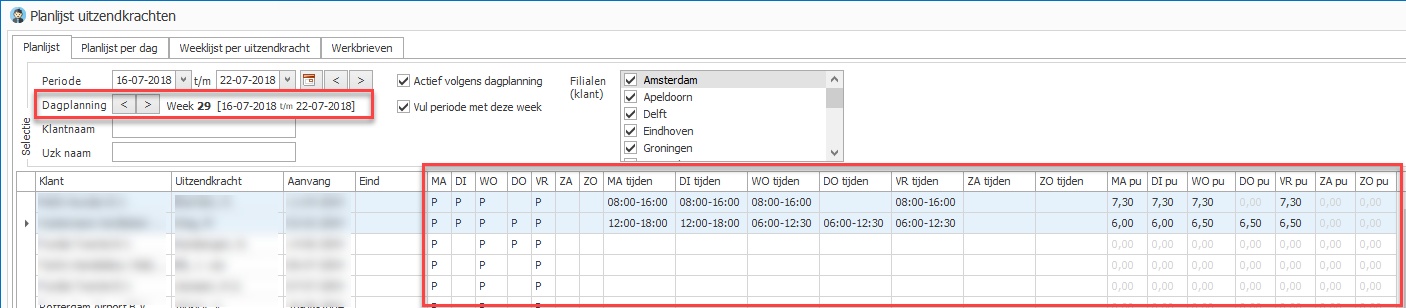
It is now possible to display daily columns in the planlist. These columns (Monday to Sunday) can show all the data that can be entered in the day planning:
Scheduled (P)
Working hours
Scheduled hours
Of course, you can use the list definitions to specify which of these 21 columns are displayed, and in what order.
Information from the day planning is always displayed on a weekly basis: the day planning week. When the planlist is opened, it is automatically set to the current week. The week selection can be adjusted using the selection fields, after which the data is automatically refreshed.
Weeksheets in the planlist: now on a separate tab
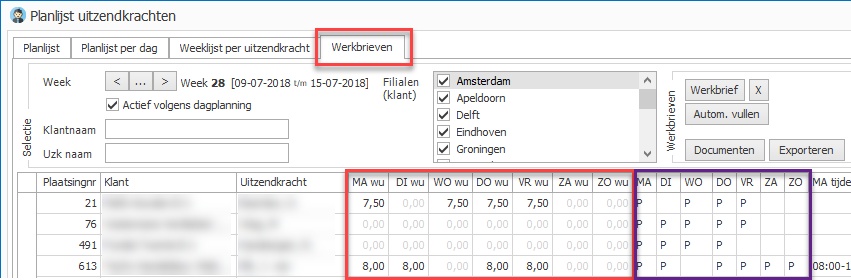
The display of the planlist, combined with the hours from a weeksheet and the group of buttons for performing actions on weeksheets, has been moved to a new, separate ‘Weeksheets’ tab in the planlist.
The previous week is always selected on this tab. This week determines which placements, weeksheets and day planning are displayed. Selecting a different week updates all this data accordingly.
The new day planning columns, as described above, are therefore also available on this new ‘Weeksheets’ tab (see the purple block in the image above).
All existing list definitions (screen and Excel) from the standard planlist have been copied to the planlist with weeksheets. The columns containing weeksheet data have subsequently been removed from the planlist, as that data is no longer available there.
Accommodation
Accommodation overview: occupancy rate
The accommodation overview now includes a column showing the occupancy percentage. This is based on the date in the top-left corner of the screen.
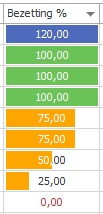
As the percentage is also displayed as a progress bar, it is quicker to see, for example, where under-occupancy is greatest.
The baseline is the accommodation’s normal capacity.
As usual, this column can be added via the list definition in the Accommodation Overview.
Actual occupancy over a period
A new column, ‘Period occupancy’, is available in the accommodation planlist. This shows the actual occupancy for each accommodation over the period specified in the planlist.
Specifying a country
It is now possible to specify a country in the accommodation table. As usual, this country can be made visible on the various lists and documents as required.
Accommodation planboard
The weeks are now displayed slightly wider so that larger numbers are immediately visible.
Miscellaneous
Employee levels in colour
The table showing employee levels now includes an option to assign a separate colour to each level. In the various lists where the level is used as a column, the colours set will now be displayed.
Emailing clients
The email button on the client overview now has an additional option to email only the correspondence contacts.
Furthermore, this email function has been made more robust for use with very large numbers of clients.
Scan distributor
The scan distributor now also supports intermediaries and equipment.
The scan distributor has been optimised internally to start up more quickly. The scan distributor icon in the menu has also been updated.
QR code recognition has been further improved.
With automatic archiving, a document is now accepted even if it does not yet contain an employee number, provided that the number is already in the database.
The account types table can now be edited
Until now, this table could not be edited. It is now also possible to mark account types as ‘hidden’ or to delete them.
See Employee->Tables->Account types.
Equipment
A ‘In use by’ button has been added to the details screen for an item, allowing the relevant employee to be opened directly.
This is useful, for example, if the item is mentioned in the alert and the current user of the item needs to be displayed.
The columns in the overview for the ‘Number’ and ‘Certificate’ fields are wider.
The ‘Number’ field has been widened from 10 to 20 characters.
When an item is flagged, its number is now also displayed as an identifier.
Retention period for an employee’s registration
A 6-month option has been added to this central setting.
Miscellaneous
Issue with copying a user level resolved
Sorting by age did not always work correctly in some lists; this has been rectified.
Saving availability via the calendar now works much faster.
An issue with entering evaluations from a placement has been resolved.
Employee planboard: the absence count no longer takes unscheduled placements into account
The number of certificate types that Regelneef can process has been expanded.
The column showing the number of days in the tabs for an employee now displays zero days instead of one when there is a future start date without an end date.
The ‘Known through’ field for a client can now also be set as a required field.
