Regelneef 19.5
VAT number check
Regelneef now offers the option to quickly check the VAT number of a client, subcontractor or self-employed person. In addition to entering the VAT number, you can click on Check, whereupon Regelneef will verify the number via the European Commission’s dedicated service.
The result is displayed immediately. If the number is valid, the name and address registered to the number are also displayed, provided that this information is not restricted. If desired, a screenshot can be taken as proof of validity at that moment.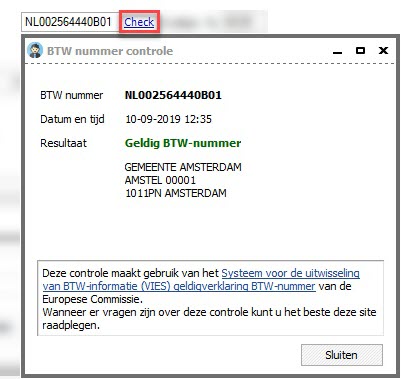
Number of accommodation days per week
Regelneef will automatically start tracking and making available more weekly figures. An initial result of this is now available: the number of accommodation days for an employee in a given week.
The ‘Accommodation days per week’ column has been made available in the following places:
Employee planlist, Planlist tab
Employee planlist, Weeksheets tab
Day planning in the placement documents
It has been possible for some time to display the day planning in the planlist, or to export it to Excel via list definitions. However, this day planning was not available in the codes for merging with Word or Excel documents.
This has now been made possible. In the placement documents, all data from the day planning (the ‘P’, the scheduled times, scheduled hours, week number and start date) can be used. Regelneef includes this data based on the selected planning week in the planlist.
This therefore offers new possibilities for exporting the weekly schedule, broken down by day, to, for example, a pre-created Excel document.
In addition to these day planning fields, codes are now also available for:
Order confirmation signed by the client
Placement confirmation signed by the employee
Initial check completed
Tax value of car
It is now possible to record the tax value of a company car.
Searching within list definition columns
In certain screens, Regelneef offers a wide range of available columns, which are sorted alphabetically. To make it easier to find the desired column, a filter has now been added that allows you to search for part of the column name.
Import employee intermediary
The import module for employees now also supports a column containing the name of the intermediary.
Miscellaneous
Changing times in the day planning via the ‘Edit Placements’ screen sometimes did not work; this has been rectified.
A validation check has been added to the evaluation screen for the maximum length of 100 characters; this prevents problems when saving changes.
The table showing nationalities did not refresh immediately on the screen following a change; this has been rectified.
An issue relating to the use of Regelneef in a different time zone has been resolved.
The tab showing all a client’s requests was sometimes not populated correctly; this has been resolved.
