Regelneef 20.1
Multi-monitor support and tabbed layout
The way screens are handled has been modernised: most overview screens now open automatically as tabs within the main screen. This makes it much clearer which screens are already open, and makes it easier to switch between them.
Any screen within Regelneef can now also be dragged outside the main screen or onto another monitor.
Notifications of new actions are now integrated into the right-hand side of the main screen.
Tabs
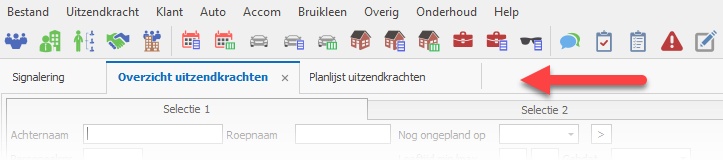
A screen can be opened as a tab or as a floating window. Most overview screens make good use of the full screen space and therefore open as tabs.
Detaching tabs
A tab can be detached by dragging it away from the tab bar and dropping it as a floating window in the desired location, on any monitor.
Closing tabs
Tabs can be closed by:
The button on the right-hand side of the tab
Via the menu by right-clicking on the tab. This also allows you to close all other tabs at once.
The familiar control options such as the Esc key, or buttons such as ‘OK’ or ‘Close’
Moving tabs
The order of tabs can be changed by dragging them to the left or right.
Floating windows
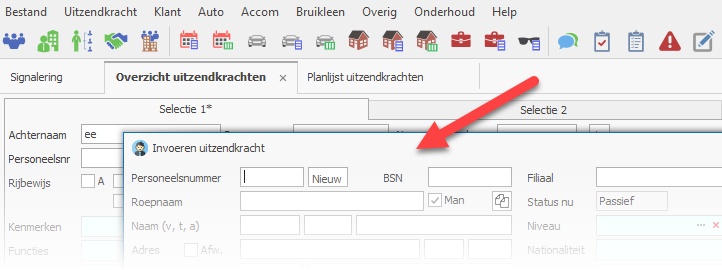
A floating window can be displayed separately on any monitor.
Each floating window can also be accessed by clicking the Regelneef icon on the Windows taskbar. When a floating window is minimised, it can be restored via the taskbar icon. The icon also provides an additional option to close a floating window.
If desired, a floating window can be added (back) to the tabs by dragging it there.
New actions

Notifications of new actions now appear in a fixed section of the main screen, on the right-hand side. This is only visible when there are new actions.
The action list disappears once the new actions have been marked as ‘Seen’ using the button of the same name. Another button allows you to hide the new actions by collapsing the section to the right.
When there is a further update to the list of new actions, the list reappears.
Miscellaneous
All input fields now use the same font as other sections, giving the whole interface a more pleasant and uncluttered look.
A new colour theme is available: Office 2019 Colorful.
It is now possible to configure whether blocked employees should be excluded when searching for employees (this is the default setting).
An error message that occurred when importing a Freepack import file has been resolved.
The subcontractor contact person’s surname prefix field has been expanded.
An issue with exporting client rates to Excel has been resolved.
The subcontractor’s VAT number is now available as a planlist column.
