Regelneef 24.4
New login system
To further ensure the security of Regelneef, Regelneef is using a new system for user authorisation and the security of internet traffic.
How it works
The sign-in page opens automatically from the Windows application’s login screen.
You can log in there using your email address and password, after which your email address will be displayed on the login screen.
The ‘Log in’ button will then become active. This allows you to start the session.

New features
If you have recently logged in to your system, the sign-in page will close immediately and your previously verified email address will be displayed automatically on the login screen.
If you have access to multiple Regelneef databases using your email address, you will no longer need to log in separately to the next database after logging in to the first one.
The sign-in page is web-based, which can provide handy options for filling in the fields.
Using the ‘Forgotten password’ function, a user can reset their password themselves by requesting a reset email.
Setting a new password
Due to the transition to the new login system, every user must set a new password. To this end, every Regelneef user received an email on 27 September containing instructions.
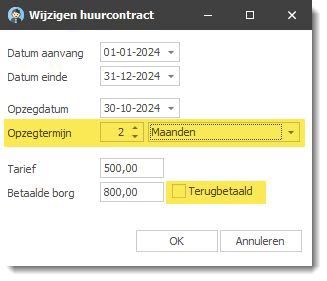
Extended accommodation rental contracts
Two new fields are available:
Notice period
Deposit refunded
These details can also be added as columns to the Accommodation overview and Accommodation planlist.
Date filter on date columns
Every date column available via list definitions now displays a filter button when the mouse is hovered over the column header.
A small pop-up window then opens for filtering the dates in the list. Here, a date or date range can be selected via a calendar. Based on the dates in the column, smart selection options such as ‘Last month’, ‘Last week’ and ‘Today’ also become available.
Scan distributor
An ‘Active’ column has been added to the list of employees.
