TIP: Merging label sheets
Merging data into documents is a frequently used function within Regelneef. Normally, the entire base document is repeated for each record with which it is merged. So, for example, if a two-page letter is merged with details for eight selected employees, the result is a document totalling 16 pages. The help function describes in detail how to create a Word layout.
A label sheet (often an A4-sized sheet with, for example, 16 labels) is different, as it must be possible to print multiple employees on a single page. A label sheet for Regelneef can be created as follows.
Create a new single-page Word document and insert a table with the same number of columns and rows as the label sheet. You must take into account any outer margins on the label sheet, and of course the exact height and width of a single label. By printing the document (on ordinary paper), you can check whether the table’s grid aligns correctly with the position of the labels on the label sheet. If everything is correct, the table borders can be made invisible so that they are no longer printed.
The merge codes can then be inserted. These must be placed in every cell of the table. In this example, the codes represent the address of an employee.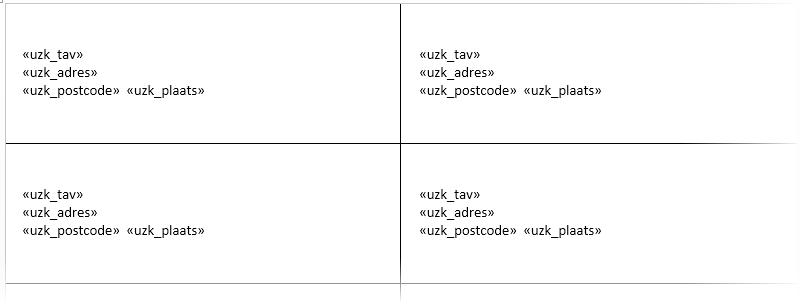
Another special additional step is that so-called NEXT codes must be inserted. These ensure that Regelneef uses the next record for each cell. This Word code is best inserted after pressing Alt+F9 in Word; this temporarily displays more information about the codes (otherwise the NEXT code cannot be seen). The NEXT code must be the first code inserted in every cell, except the first one.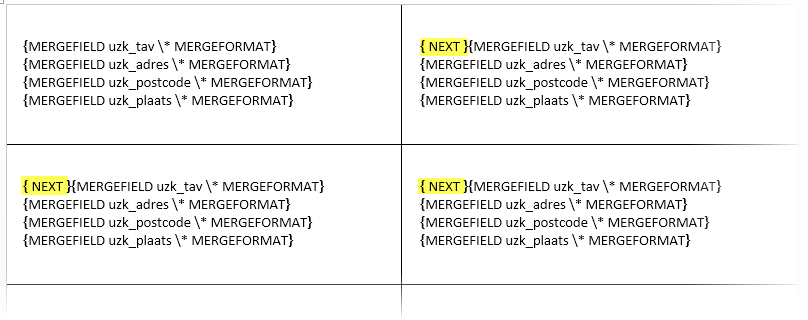
The merge document is now ready and can be imported into Regelneef so that everyone can use it. It is important that the word ‘etiket’ appears in the name of the layout in Regelneef; this ensures that Regelneef treats it as a label sheet. The result is as follows.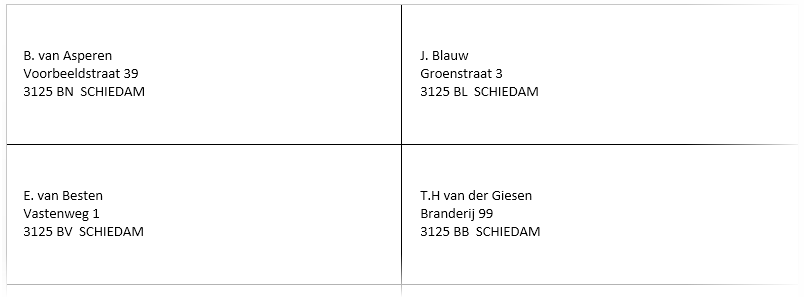
To make it even easier to use labels, sample layouts are already included with Regelneef. In the ‘Reports’ subfolder within the program folder, you will find sample layouts for employees and clients.
