Automatically translated from Dutch. Some wording may be inaccurate.
An Excel layout is a normal Excel file filled by Regelneef. An Excel merge definition specifies which data goes into which cells and columns. This definition is stored in Regelneef, not in the Excel file. Open it by clicking New or Edit in the layouts screen. When Excel is selected, a Merge definition button appears.
Excel merge definition
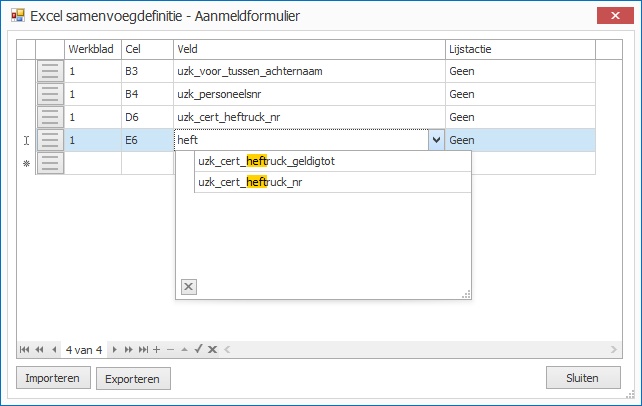
The definition specifies what Regelneef writes into each cell. Add a row by moving focus to the bottom row.
Definition-row fields
The following settings are available:
Worksheet
The worksheet number, initially 1.
Cell
The cell address in [column letter][row number] notation.
Field
The field Regelneef writes into the cell. Choose from the drop-down list; typing a few letters filters it immediately.
List action
Determines what happens if multiple records are selected for the document. There are two options:
None |
Only the first record is shown; the rest are ignored. This is appropriate for a form intended for one employee at a time, as in the illustration above.
|
Fill vertically |
Records are written below each other, producing a list in Excel. The template row is copied with its formatting and inserted below to make room for all records. |
Reordering by dragging
New rows are added at the bottom. To reorder them, drag the three-line handle on the left of a row to another row. The dragged row is placed below it.
Import and export
You can import all rows of an Excel merge definition from a file. Create such a file with Export. This makes it easy to transfer definitions to another Regelneef database.