Automatically translated from Dutch. Some wording may be inaccurate.
26.3.0 21 September 2026 |
English help system
The help system is now also available in English. If you use Regelneef in English, opening a help page automatically displays the English version.
The texts have been automatically translated from Dutch, with attention to Regelneef terminology. Some wording may be less accurate. The help system is being expanded, so explanations of more features will become available over time.
New API: more integration options
Regelneef now has an external API, allowing other software to exchange data with it. This creates more opportunities to connect Regelneef to your organisation's systems, automate work and reduce duplicate entry.
For example, an integration can process data from another system in Regelneef or make Regelneef data available for further processing. Discuss the possibilities with your software supplier or developer.
This extension is another step in Regelneef's development, helping it fit your processes and work with other software.
Find the settings under Maintenance → Settings → Integrations. Here you can enable the API and manage API keys. Share the technical API documentation with your software supplier or other parties developing an integration with Regelneef.
The API is not yet complete, but already provides a useful foundation for integrations. We will extend it further, taking practical needs into account.
API keys
The new API includes a new system for managing API keys. A key gives an integration access to the Regelneef API. You can issue multiple keys so each integration uses its own.
This shows what each key was issued for, who created it and whether it is still used, making access easier to understand and manage.
If an integration is no longer needed or you want to end its access, revoke its key. Access through that key stops while other integrations continue using their own keys. You remain in control of access to Regelneef.
Additional security with a digital signature
Both the Regelneef installer and the software itself now carry a digital signature from SunBase Software. This proves their origin: Windows and security software can check that they came from us and have not changed since signing.
This adds security when installing and using Regelneef and helps Windows and security software recognise it as trustworthy. No action is required on your part.
The installer remains available from sunbase.nl/downloads.
Business liability insurance for subcontractors
Subcontractor details can now include the insurer, selected from a table, and the business liability policy number. These fields are available as columns and in subcontractor documents.
Clearer user-level organisation
Permission settings within user levels are now sorted more logically, following Regelneef's menu order. This makes them easier to navigate.
Other changes
Employee indicator
Current entries on tabs such as placements and accommodations are highlighted more subtly. This replaces blue text, which did not always work well with certain colour themes.
Health insurers table renamed Insurers
This table now also covers other types of insurer, so it has a more general name.
Contract active accommodation column
This new column in the accommodation overview and planlist indicates whether a rental contract is currently active.
26.2.0 13 April 2026 |
Updated 2FA
Protecting access to your data is essential. Alongside good passwords, we strongly recommend two-factor authentication (2FA), which substantially improves database protection with little effort.
Regelneef's 2FA has been updated:
•Fully integrated into the login screen
•Option to remember a device for 30 days
The second step follows immediately after entering your email address and password:
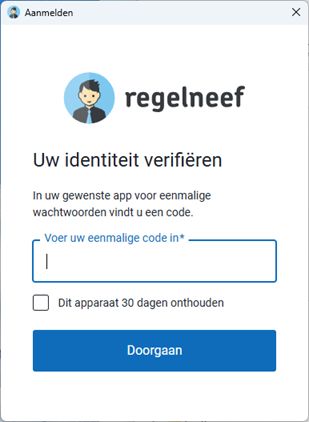
A supervisor can centrally enable 2FA under Maintenance → Settings → Security.
The setting then applies automatically to all database users.
At their next login, each user sees a QR code to link their account to an authenticator such as Google Authenticator.
Extended subcontractor rates
Subcontractor rates can now include extra columns for overtime and premium-hour percentages, working in the same way as rates in client details.
Also:
•The subcontractor overview has a new contact-surname search field.
•The subcontractor G-account field is wider.
Export profiles
The Regelneef XML file format is increasingly used to exchange data between Regelneef databases.
Exports normally include everything supported by the format. The new Export profiles table (Employee → Tables) lets you create profiles to select when exporting employees.
A profile specifies:
•Which fields to export
For example, exclude the subcontractor from an export.
•Renaming selected certificates
Useful when the destination database uses slightly different certificate names that would otherwise not be recognised during import.
Regelneef web forms
SunBase now offers custom online forms for your organisation, such as registration forms with document uploads. A demonstration is available at https://app.regelneef.net/demo/aanmelding/isolatie.
Submitted forms appear directly in your database's import module, where you can review and import the data and documents. Regelneef shows the number of waiting employees in real time:

Please contact us if you are interested in using this for your own registration forms.
Filling in a Regelneef web form
These forms are intended for manual entry, but Regelneef can fill in much of a form automatically from your database, saving time and reducing errors.
Register the form's address in the new Web forms table (Maintenance → Settings → Integrations), together with an export profile for the correct certificate names.
A Web form button then appears in Export employee. It opens the form with the selected employee's details filled in automatically.
This works only for Regelneef forms, recognised by addresses starting with app.regelneef.net.
Regelneef XML import
Importing this format now offers additional options.
Link documents directly to a record section, such as a certificate
Documents can optionally specify their type, such as residence permit or a particular certificate. Importing then stores the document in the archive and links it from the relevant section.
Technical details are described here.
Additional import fields
XML now also supports
oSubcontractor
oresidence permit
oresidence permit expiry date
ocontact memo
Storage location for goods
Goods have a new Storage location field to record where an item is kept when not issued to an employee. It uses a new table maintained through Goods → Tables.
Miscellaneous
•The internal software for reading and writing Excel files has been updated.
•Client group was ignored when importing clients. Fixed.
•Employee certificate numbers can now contain 30 characters instead of 20.
•Under the new collective labour agreement rules, gross wage may be lower than the agreement wage if compensated through wage components. Regelneef still reports a lower wage but no longer prevents saving.
•The Import Inbox now opens Excel and CSV files and lets you rename files.
•Employee and client Excel imports now ignore rows without a name.
26.1.0 16 December 2025 |
Affiliate archive
Affiliate details now include a tab for storing documents.

Right-click an affiliate in the affiliate list to open its details easily:
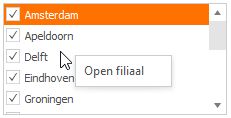
Jaicob AI integration
An integration with Jaicob (agentic AI recruitment software) is available.
 Jaicob is an AI agent designed to automate and scale your recruitment process. It can handle the workload of at least 10 full-time recruiters without the cost. Give it an instruction and it handles the rest, from sourcing and contacting candidates to finding clients, generating reports and other tasks. More information: jaicob.ai
This optional integration supports:
•Automatic synchronisation of Regelneef employee and client data to Jaicob
•Making employees found through Jaicob available in Regelneef's import module
We can activate the integration for your Regelneef environment in consultation with you.
Improved list definitions
Excel lists can now be maintained from the Excel list button using a new menu button:
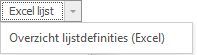
The small button below is now only for screen lists:
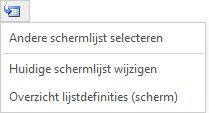
A column per property
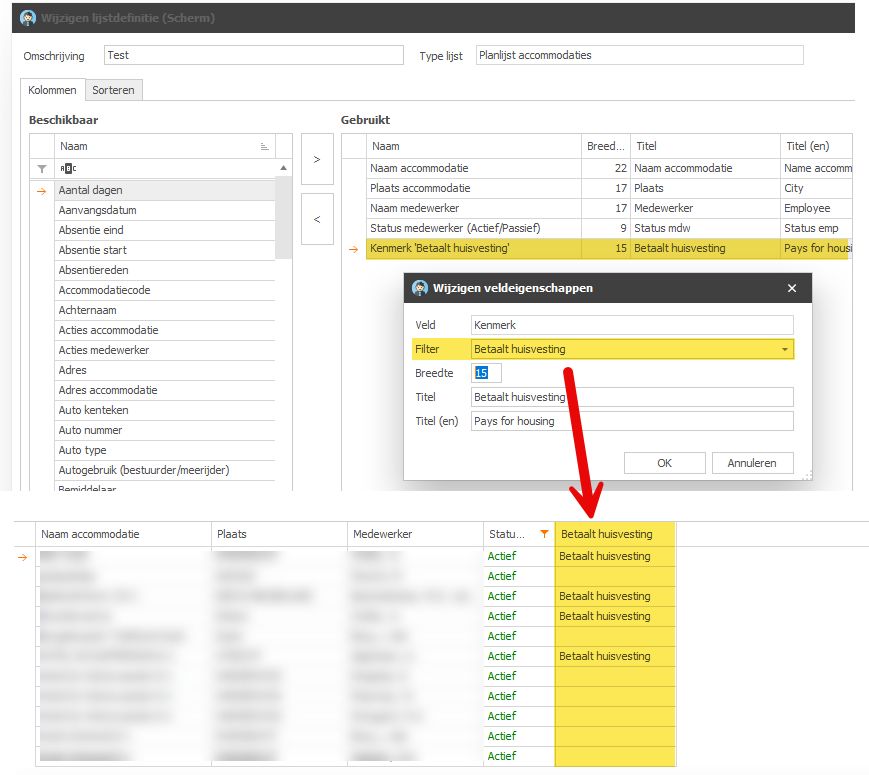
Employees can have several properties.

You can now display a separate column for a particular property, shown only when the employee has it.
When adding a Property column through list definitions, specify its filter in field properties. Regelneef offers a list of all properties in your database.
This is available in all planlists, planboards and the employee overview.
Hours worked in the planlist per day
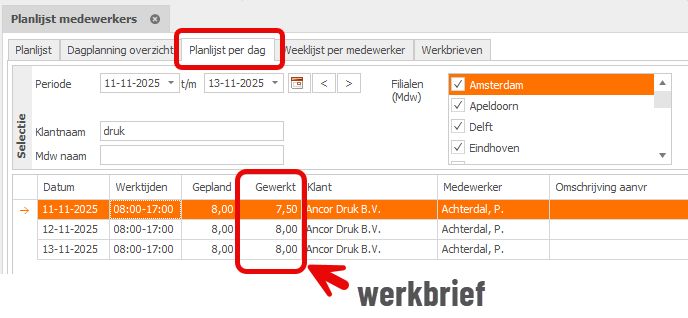
The third tab of the employee planlist, Planlist per day, shows one row for each day of a placement in the requested period. It includes the date, optional working times and planned hours from day planning, and other planlist details.
The new Hours worked column shows the total billable hours for that date from the weeksheet.
Blocking subcontractors
Subcontractors can now be marked as blocked, with an optional reason selected from a new configurable table.
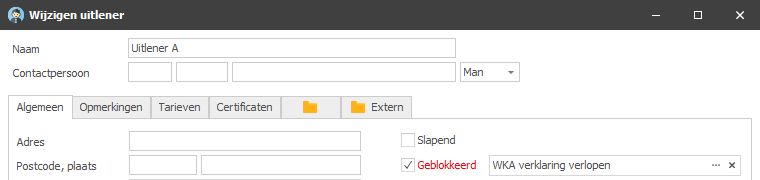
The subcontractor overview clearly marks blocked names and offers Blocked and Blocking reason columns.

Dragging files from an archive
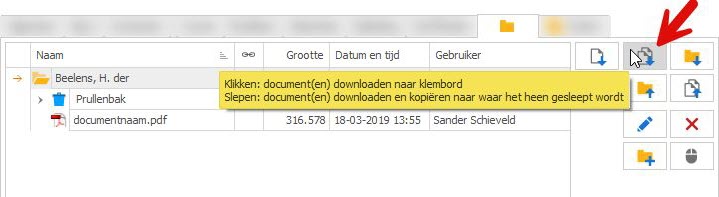
To drag files directly from the archive to another application, such as a website, select the files and start dragging from the button below.
Regelneef downloads them to a temporary location while you drag. Dropping copies them to the destination.
Miscellaneous
•CV import / Textkernel integration is no longer available.
Textkernel's pricing model and limited usage made it impossible to continue offering this integration at a reasonable price. Importing employees from CVs is therefore no longer available.
•The car rental-company field is no longer required.
•An action did not immediately disappear from the action list after changing its recipient. Fixed.