Automatically translated from Dutch. Some wording may be inaccurate.
25.3 10 July 2025 |
Cars: next service by date or odometer reading
A service is often due on a date or earlier when a mileage threshold is reached. These optional values can now be recorded for a car and displayed in car lists and the car planlist.
They are used by two new alerts:
•Car service date
•Car service odometer reading
An alert is generated when the latest recorded reading is within a configurable range below or above the service threshold.
Accommodation rental company table
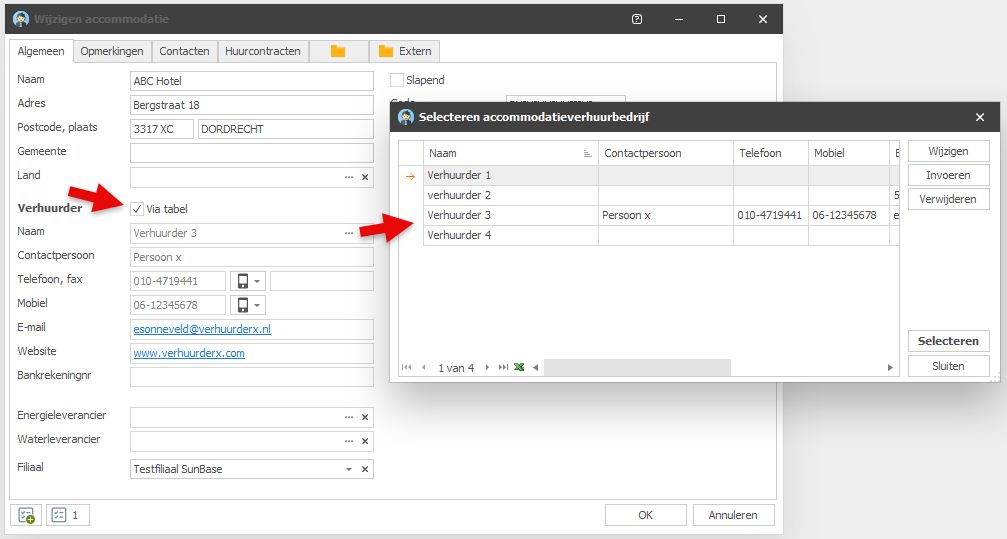
Rental company details can now be stored in a table and referenced by multiple accommodations.
To use a reference, enable Via table. After selection, the rental company fields are displayed read-only.
With Via table off, the accommodation's existing fields remain editable as before.
If Via table is enabled when a rental company name is already entered, Regelneef checks whether that name exists.
•If it exists, Regelneef asks whether to link to it.
•If it does not exist, Regelneef offers to add the rental company to the table and link to it.
Remarks present column
The accommodation overview now offers Remarks present, indicating whether remarks have been entered. Double-click its value to open accommodation details directly on the Remarks tab.
The column is also available in the accommodation planlist.
AI for employee imports
AI to match a table value
Exact matching may fail during import because a value uses another language or slightly different spelling.
AI can help find the correct match. New buttons beside selected employee import fields provide this option.

For example, it can match a code or variants such as 'Polish', 'Polen', 'Polski', 'POL', or even misspellings such as 'Poolss'.
AI to split addresses into street, number and suffix
If the entire address is in the Street field, a new smart function can split it.

Alerts
•Alerts no longer depend only on dates. Car mileage is now supported, for example. The triggering number can be displayed using list definitions.
•The alert-period settings now have a Unit column indicating days or kilometres.
•Alert statuses now support English.
Configurable proposal-status colours
You can assign colours to a candidate's status within a request. They appear in:
•Candidates in the request
•Proposal overview
•The employee's Proposals tab.
Red warning symbol for blocked employees
Blocked employees now have a clear red warning symbol beside their name in the employee overview.
New settings
•Integrations - Freepack export:
Setting for 'Payslip by email' when exporting employees to Freepack
•Employee:
The default for 'Pay reserves immediately' is now configurable.
Miscellaneous
Expanded help system
New help pages have been added for accommodations, cars, screen lists and list definitions.
Longer house number and suffix fields
Both fields now allow 10 characters instead of 5.
Client address in employee planlist
New columns: client address, postal code and city.
International SMS sender
The SMS sender can now be a longer international number. Sender names remain limited to 11 characters.
English version
These previously Dutch elements are now translated:
•Pay reserves immediately
•User permission settings for other affiliates
•Alert status
25.2 17 March 2025 |
App: new action notifications
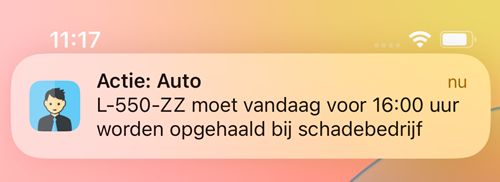
The Regelneef app now supports notifications on your mobile device, including new actions assigned to you.
Send import files to another database
To transfer employees to another Regelneef database, create a Regelneef XML export from the employee overview and open it in the destination employee import module.
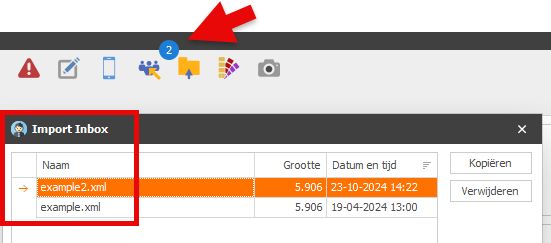
This is now easier: send the export directly to a database's Import Inbox. No separate file exchange is needed; the file is ready to import and the destination receives a notification.
Configuring known databases
Register destination databases once in Known databases under Maintenance → Settings → Integrations. Enter two fields: Name and API key.
•The name can be any clear description of the destination database.
•Use the API key retrieved from the other database under Maintenance → Settings → Integrations → API key. Import Inbox must also be enabled in that database.
Sending a file
•Select employees in the employee overview and click Export
•Choose Regelneef employee XML as the format
•Click Import Inbox
•Select the destination database, if there are several, and click Send
The destination immediately shows that a new import file is waiting:

New for accommodations and cars: Key location
Record where the key is kept, for example its exact location in a key safe.
New for cars: Appraised value
If a car's tax value is based on an appraisal, this can now be recorded with a checkbox.
Car odometer readings in lists
The latest reading and its date are now available in the car overview and car planlist.
New for placements: Framework agreement date
Particularly for self-employed placements, later placements may refer to a framework agreement. You can now record its date and include it in documents.
Employee planlist: Other planning date
The new Other planning date in selection criteria determines which date is used for accommodation, car use, goods and absences shown in the planlist.
It is empty by default, so the earliest other planning within the requested period is used. Fill it in to select an exact date. Thus:
•Period dates determine which placement records appear
•The optional Other planning date determines accommodation, car use, goods and absences displayed in the columns.
Help in your browser
Regelneef help is now online and opens in your browser, enabling features such as bookmarks and automatic translation.
Improved employee imports
•Employee import details now show more clearly which fields were absent from the file and will be ignored.
•A clearer progress indicator is now shown during employee import.
Miscellaneous
•Placement order numbers now allow up to 60 characters.
•Certificate names can now be changed or deleted during employee import.
•With 'Always show layouts collapsed', the first group still expanded. Fixed.
•When an item is set to View in a permission level, Insert and Delete are now cleared by default.
•Archive: improved display when dragging documents between folders.
25.1 9 December 2024 |
Temporary worker → Employee
Regelneef now uses the Dutch term 'medewerker' instead of 'uitzendkracht', as it better fits many real-world situations.

This renaming applies almost everywhere, except technical elements such as merge codes, which retain the abbreviation 'uzk'.
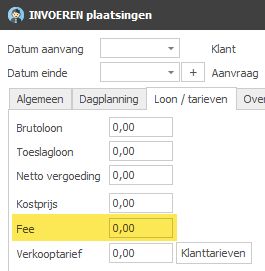
Placement fee
A placement can now record a fee amount, for example an intermediary's fee per hour worked.
The fee is available in employee planlist and weeksheet columns. Intermediary man-day statements now include the weekly fee (hours × fee) and total per intermediary. |
|
New import files on the toolbar
The toolbar now shows the number of files in the Import Inbox. This updates in real time when files arrive through the API or are removed after import.
New employee planboard popup
Hover over a day cell to see a summary tailored to the row type.
Besides the scheduled count, it shows:
•Absence details for employees scheduled that day
•For a request: people required that day, request description and discipline function.
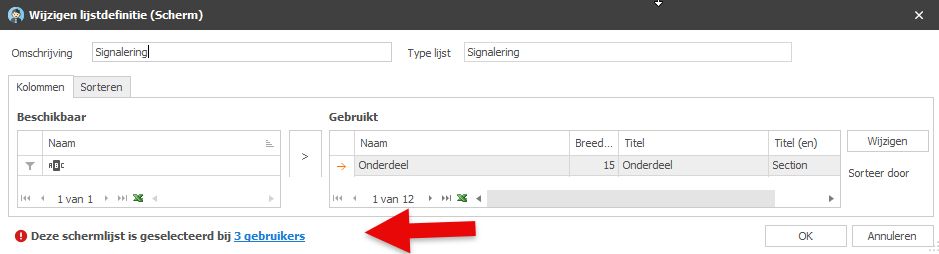
Screen-list users
When editing a screen list, it is useful to know who will be affected. A single definition applies to everyone; if several exist, you need to know who uses the current one.
This information now appears at the bottom of screen-list definition details.
Actions in the app
The November app update added actions. The full action list is available from the main menu, and many detail screens, including employees, now offer buttons to view, edit and create actions.
Improved alerts
•Alert types and sections now appear in English in the English version.
•Inactive retention-period alerts now show the actual period (2, 5 or 7 years) rather than A, B or C.
Set an invoice number on multiple weeksheets
The new Edit multiple weeksheets option assigns the same invoice number to all selected weeksheets.
Other
•The login language is now remembered per user on a Windows system.
•Required-field settings under Maintenance now support English.
•Employee imports now match certificate names regardless of letter case.