Automatically translated from Dutch. Some wording may be inaccurate.
A screen list is a list of data in Regelneef, often with several columns. The following features help you work with these lists.
Selecting multiple records
Where supported, select multiple records in the following ways:
Ctrl+click
Hold Ctrl while clicking to select individual records.
Shift+click
To select a consecutive range, click the first record, then hold Shift and click the last.
Ctrl+A
Click a record to focus the list, then press Ctrl+A to select all records.
Sorting
Click a column heading to sort by it. Click again to reverse the order.

To sort by several columns, hold Shift when clicking the next sorting column's heading.
Filtering by column
Some columns support filtering. Hover over a column heading to reveal a filter button on the right. Clicking it opens a filter dialog based on the column's current contents. Click OK to apply it.
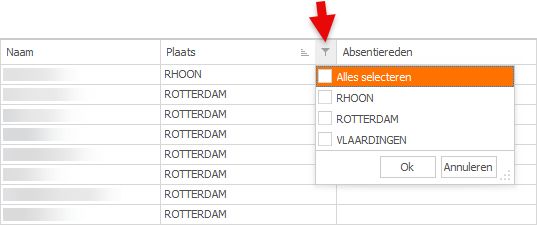
Text columns show a list of distinct values to select. Date columns show a calendar and other useful choices based on the dates present.
Searching a column by typing
Click a cell to focus the column and start typing. Each letter moves the active row to the nearest match. The search text is highlighted in yellow in the cell.
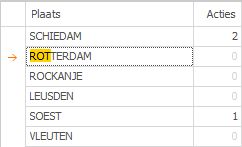
Next match: Ctrl+Down
Previous match: Ctrl+Up
Remove the last search character: Backspace
Export to Excel
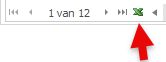
Every screen list has a small Excel button at the bottom. It exports and opens the current list as an Excel file.
Longer column descriptions
If a column title is unclear, a longer description may be available. Hover over the heading to display it.
