Regelneef 25.3
Importing CVs with TextKernel
Regelneef now has an integration with TextKernel to enable CVs to be imported. TextKernel specialises in recognising as much information as possible from CVs, including education and work experience. Using the results of this process can significantly reduce the need for manual data entry. This therefore saves time and minimises errors.
This feature is available in the ‘Import Employees’ module, using the ‘Import from CV’ option. The screen shown below will then appear.
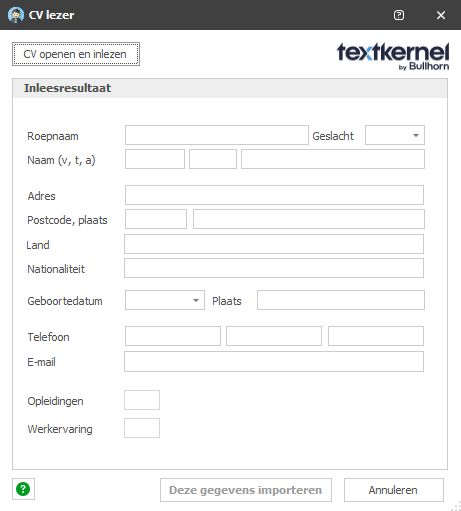
You can select a CV file to import, after which it is sent directly to TextKernel and processed. This takes a few seconds, after which the result is displayed. The number of lines for education and work experience is also shown.
Clicking ‘Import this data’ transfers the data to the import module, where it is checked and adjusted if necessary.
TextKernel does not split an address into street, house number and suffix. This can be easily resolved by clicking the new AI button next to the address to split it.
Country and nationality are often displayed as codes. The smart AI buttons can also be used for this; in many cases, they will select the correct table value from your database.
To enable the import of education and work experience, the import module has been expanded to support these fields.
The CV file itself is also included in the import. It is then automatically placed in the archive of the imported employee.
Costs
There is a charge for using the TextKernel integration: 0.25 cents per document imported. This is invoiced monthly in arrears. There are no fixed monthly charges for having this integration active: if it is not used, there are no additional costs.
The first 8 CVs are free
You can try out the integration completely free of charge: we’ll cover the cost of importing the first 8 CVs.
Disabling the integration
The TextKernel integration is active by default. If desired, it can be disabled via Maintenance->Settings->Integrations. The option to import via CV will then no longer be available to any users once Regelneef has been restarted.
Car: Next service by date or mileage
Often, the next service is due on a specific date, or earlier, once a certain mileage has been reached. This information can now be optionally recorded for a car and displayed in the car lists and the car planlist.
This information is used for two new alerts:
Car service date
Car maintenance mileage
If the most recently entered mileage falls within a certain range above or below the service mileage, this is flagged. This range is configurable.
Table for accommodation rental companies
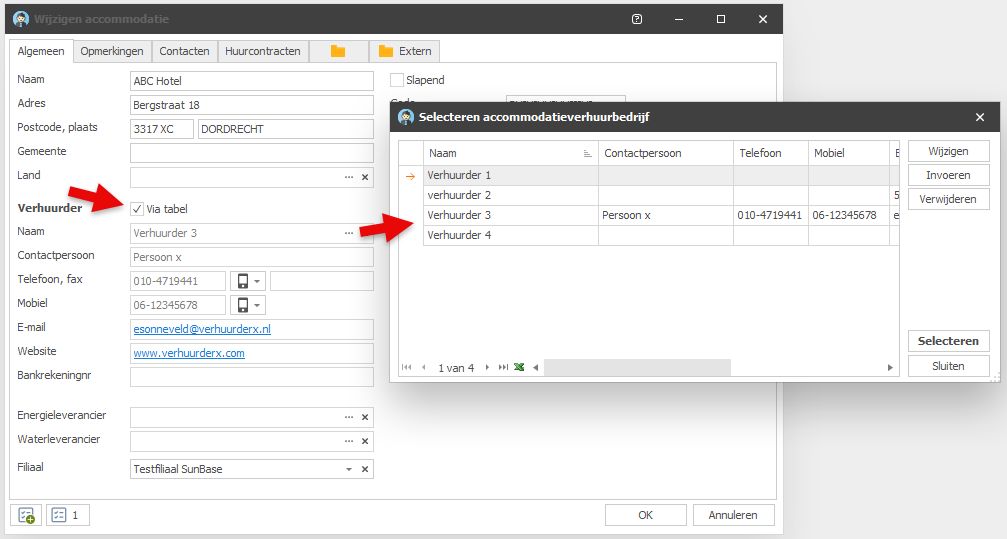
Details about the rental company can now be entered into a table, so that multiple accommodations can be linked to it.
To create a reference for an accommodation, ‘Via table’ must be ticked. Once selected from the table, the fields from the table are displayed as read-only.
If ‘Via table’ is not ticked, the existing fields for the accommodation itself remain active, as before.
If ‘Via table’ is ticked whilst a rental company’s name is already entered, Regelneef checks whether a rental company with that name already exists.
Name already exists: Regelneef will then ask whether a reference should be made to that rental company
Name does not yet exist: Regelneef will ask whether to automatically add the rental company to the table and link to them.
‘Remarks present’ column
A ‘Remarks present’ column has been added to the Accommodation overview. This indicates whether anything has been entered in the accommodation’s remarks section. Double-clicking the value opens the accommodation’s details screen, with the Remarks tab open by default.
This new column is also available in the Accommodation planlist.
AI for employee imports
AI for matching a value from the table
When importing data, it may happen that a particular value cannot be found in the table via an exact match. This could be because the value to be imported is in a different language, or is spelt slightly differently.
AI can then help by finding the correct match anyway. Regelneef has been given handy features for this when importing an employee, which can be seen via a new button next to certain fields.

In this example, the AI still finds the correct value, even though a code has been entered. For example, ‘Polish’, ‘Polen’, ‘Polski’, ‘POL’, or even with spelling mistakes such as ‘Poolss’.

AI to split an address into street, number and suffix
If the address is entered as a single string in the ‘Street’ field, a smart function can now be used to split it.
Alerts
Alerts are no longer based solely on dates. In this version, for example, a car’s mileage has been added, which is a number rather than a date. This alerted number can now be made visible via the list definitions.
A ‘Unit’ column has now been added to the screen showing alert periods, indicating whether the unit is days or kilometres.
The alert status now supports English.
Proposal status with customisable colours
You can now assign different colours to a candidate’s status within a request. These will then be visible in:
The candidate in the request
Proposal overview
The ‘Proposals’ tab for the employee
Red warning symbol when blocked
In the Employee overview, a clear red warning symbol is now displayed next to the name of a blocked employee.
New settings
Integrations – Freepack export:
Setting for ‘Payslip by email’ when exporting an employee to Freepack
Employee:
The default value for the ‘Pay reservations directly’ field for an employee can now be configured.
Miscellaneous
Help system expansion
Various new help screens have been added for accommodation, cars, screen lists and list definitions.
Wider house number and suffix fields
The house number and suffix fields have both been widened from 5 to 10 characters.
Client address in employee planlist
New columns are now available in the employee planlist: client’s address, postcode and town.
International SMS sender
When sending an SMS, a longer international number can now also be specified as the sender. The maximum length for a name as the sender remains 11 characters.
English version
Dutch elements have now been translated in the English version:
Pay reservations directly
Setting user permissions for other affiliates
The status of an alert
