Regelneef 26.2
2FA updated
It goes without saying that securing access to data is extremely important. In addition to using strong passwords, we therefore strongly recommend using Two-Factor Authentication (2FA). This allows you to significantly increase the security of your database with minimal effort.
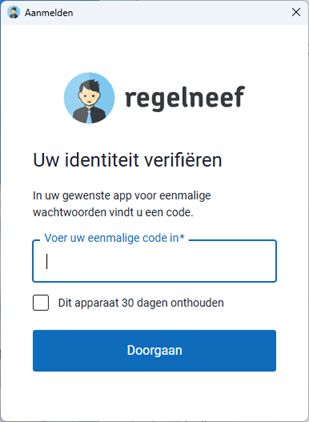
The way 2FA works in Regelneef has been updated:
Fully integrated into the login screen
Option to remember a device for 30 days
The second step follows immediately after entering your email address and password:
2FA can be enabled centrally by a supervisor with a tick in Maintenance->Settings->Security.
The 2FA setting will then automatically become active for all users of the database.
The next time each user logs in, they will be shown the QR code to link their account to, for example, Google Authenticator.
Expansion of rates for subcontractors
Rates for a subcontractor can now also include additional columns showing the percentages for overtime and surcharge hours. This works in the same way as the rates already do in a client’s details screen.
Furthermore:
A search field for the contact person’s surname has been added to the subcontractor overview.
The ‘G-account’ field for the subcontractor has been widened.
Export profiles
The Regelneef XML format is a file format that is increasingly used to exchange data between Regelneef databases.
When creating an export in this format, everything supported by the format is normally exported. With the new ‘Export Profiles’ table (Employee -> Tables), this can now be customised by creating a new profile there, which can then be selected when exporting employee data.
In a profile, you can specify:
Which fields to include in the export.
For example, to ensure that a subcontractor is not included in the export.Renaming specific certificates.
This is useful if certain certificates have slightly different names in the target database, meaning they would otherwise not be recognised during import.
Regelneef Web forms
A new service from SunBase is that we can create and host a bespoke online form (such as a registration form) for your company, with the option to upload documents. A demo example of such a form can be found at https://app.regelneef.net/demo/aanmelding/isolatie.
A completed form will then be immediately available in the import module of your Regelneef database, so that the data (and associated documents) can be definitively imported once checked. Regelneef displays in real time the number of employees ready to be imported:

Please feel free to contact us if you are interested in potentially implementing this for your own registration form(s).
Filling in a Regelneef web form
Such an online form is intended for manual input, but with Regelneef we also offer the option to have such a form largely filled in automatically. This saves time and reduces errors when you need to complete such a form using data from your own database.
The new ‘Web Forms’ table (Maintenance->Settings->Integrations) has been created for this purpose. Here, you can enter the web address of the form once, along with the export profile (for passing on the correct certificate names).
A ‘Web Form’ button will then become available on the ‘Export Employee’ screen. This allows you to launch the web form, whereupon Regelneef will automatically populate it with the details of the currently selected employee.
This option is, of course, only available if the form is a Regelneef form, which can be recognised by the web address starting with app.regelneef.net.
Regelneef XML import
Importing this format opens up new possibilities.
Directly linking documents to a component (such as a certificate)
For a document, you can now optionally specify what type of document it is. For example, a residence permit or a specific certificate. Upon import, the document will then, in addition to being placed in the archive, be linked to the relevant item (for example, the certificate).
Expansion of possible import fields
The following fields can now also be supplied via XML:
subcontractor
residence permit
residence permit validity date
contact note
Storage location for equipment
A new ‘Storage location’ field is available for equipment. This field is intended to specify the location when the item has not been issued to an employee. This field operates via a new table, which can also be managed via Goods->Tables.
Miscellaneous
The internal software for reading and writing Excel files has been updated.
When importing clients, the client group was being ignored. This has been rectified.
The field for entering certificate numbers for an employee has been expanded from 20 to 30 characters.
Under the new collective agreement rules, it may now happen that the gross wage is lower than the CLA wage, as this may be offset by wage components. If the gross wage is lower, Regelneef will still flag this; however, saving the data will no longer be prevented.
The import inbox now also supports opening Excel or CSV files. It is also now possible to edit a file’s name.
When importing via Excel (employee or client), rows without a name will henceforth be ignored.
