Automatically translated from Dutch. Some wording may be inaccurate.
23.4 12 September 2023 |
SMS delivery status
Regelneef now shows whether a sent SMS has been delivered according to the provider.
Two columns have been added to File → SMS archive: the current delivery status and the date and time of that status.
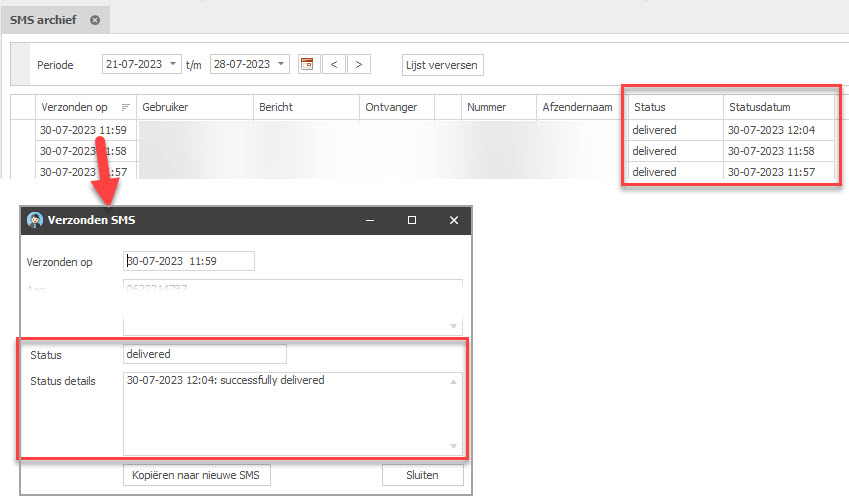
Double-click a row to open details with additional status information or error messages. These details are in English and are exactly as supplied by the SMS service.
A changed status will normally be available in Regelneef within 30 seconds. A Refresh button is available to update the list and show any changes.
We recommend checking these details regularly. They tell you about delivery and can also reveal that a number is no longer correct. In that case, you will probably need to update the person's SMS number.
SMS status is also shown on the employee's Contacts tab, after each SMS message.
Status is only available for messages sent using Regelneef version 23.3.2 or later.
Day planning overview: improved popup
Hovering over a day cell in the day planning overview displays information about that day. This popup has been improved:
•The status is explicitly stated: Scheduled, Not scheduled or Outside placement period.
•If the employee is active on another placement, the popup now shows this.
Regelneef app: add and edit placements
You can now add or edit a placement from an employee's placements or from the planlist.
Only the main placement fields are supported when adding or editing.
Other changes
•The maximum surname length has increased from 25 to 35 characters.
•The employee postcode field has increased to 8 characters, for example to support Portuguese postcodes.
•First name and Surname columns have been added to the absence planlist.
•The Fuel column is now available in the car planlist.
•The New actions window now also shows the employee number.
23.3 19 June 2023 |
Eight-week day planning overview
The employee planlist has an additional tab: Day planning overview.
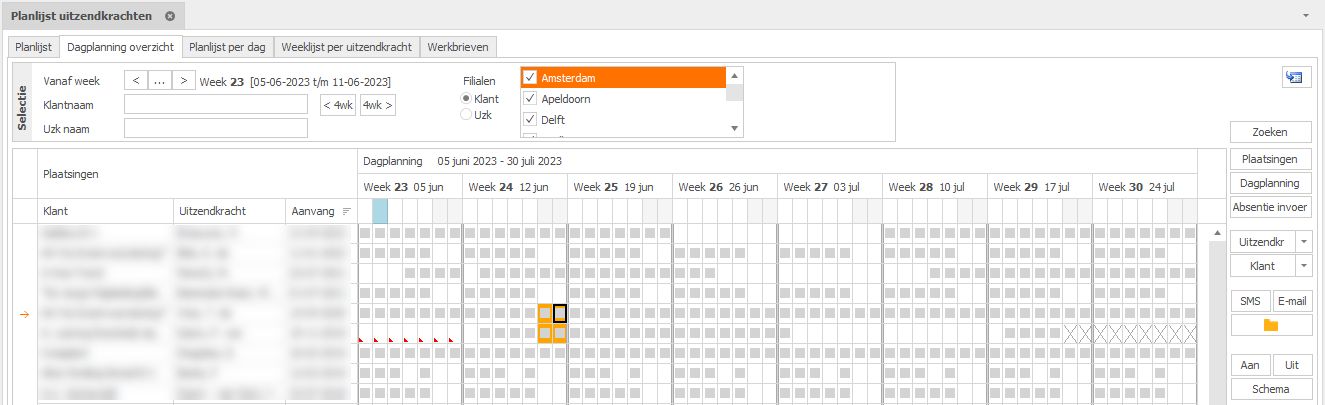
It provides a visual overview of day planning over eight weeks for all placements in the selected period.
Day planning
Day planning is the Regelneef system for enabling or disabling individual days within a placement period. All days are enabled by default, but you can adjust each day as needed.
Day planning also affects weeksheets. If days are disabled through day planning or a placement schedule, no hours can be entered for those days in the weeksheets.
Display
•A scheduled day is shown as a grey block, equivalent to the P used elsewhere in the system.
•Absence is indicated by a red corner.
Absences are recorded on the employee's Absences tab and are separate from day planning.
oA red corner on a scheduled day can therefore indicate, for example, that sickness hours need to be entered on the weeksheet.
oIf someone is absent for several days, for example on holiday, it is clearest to disable those days in day planning too. This does not happen automatically.
•Hover over a day cell for information about the date, employee, client and any absence.
•The total number of scheduled employees is shown below each day. For example, filter by client name to view staffing for that client over eight weeks.
Editing
•Double-click a day to enable or disable it in day planning.
•You can also select multiple day cells, as one block or as separate cells by holding Ctrl while clicking or dragging.
•Use the corresponding buttons on the right to enable or disable the selected cells together.
•A button lets you open and edit the underlying placements.
•You can also enter an absence, for multiple employees at once if needed.
Placement schedule
You can now assign a schedule to a placement for a fixed repeating pattern of several weeks working followed by several weeks off.
The schedule automatically fills day planning for the full duration of the placement.
To apply a placement schedule:
•Select one or more placements on the date their schedule should start.
•Click Schedule, select a schedule from the list and click Apply now.
•The updated day planning is immediately shown for those placements.
•You can still manually enable or disable days, even if they differ from the schedule. These changes are only overwritten if you apply a schedule again.
•The placement schedule and its start date can be displayed as columns using the list definitions.
•A schedule ends when its placement ends. If the employee starts a new placement, a new schedule must be entered.
Importing multiple disciplines
When importing employees, you can now import multiple disciplines per employee instead of just one.
•Excel and CSV imports support up to five disciplines: in addition to Functie, columns Functie2 through Functie5 are recognised.
•The XML import has also been updated and now supports an unlimited number of disciplines.
The Regelneef XML export now exports all of an employee's disciplines as well.
Selecting a subcontractor's purchase rate in a placement
For a placement involving a subcontractor, such as an employee hired from a third party or a self-employed worker, you can now select the purchase rate from the subcontractor's recorded rates.
A button is displayed beside Purchase rate. It opens a selection window showing the subcontractor's rates, with the employee and discipline or discipline for clarity.
When editing multiple placements together, this field has a Per row option. Select it to enter amounts separately in the relevant column. A selection button is now also shown there for placements with a subcontractor.
Other changes
•Alerts now include a 52 weeks worked type. This only works with an ABU collective labour agreement and when worked hours have been recorded in Regelneef weeksheets.
•Date and calendar elements were not always translated in the English version. This has been fixed.
23.2 24 March 2023 |
Employee change log
This new option in the Employees menu provides an overview of recorded changes for all employees. It shows the past seven days by default; you can change the period.
Use the search row and column filters to find specific details in the results.
Freepack integration with Regelneef Transporter
Freepack integration is based on importing and exporting files. The manual steps involved can lead to errors, especially when using Freepack online.
Regelneef Transporter simplifies these steps and reduces the chance of errors.
It is now available in all Regelneef import and export windows that already supported Freepack.
See the Regelneef Transporter documentation for how it works and how to get started.
Freepack / client fields
The format for exporting clients to Freepack debtors (menu 146) has changed to format 5: fixed layout / extra length.
•If you use this option, update the constants in the relevant Freepack menu once.
•Your database may have had a setting to shorten certain client fields for compatibility with Freepack. This setting is no longer used, so the maximum client name length, for example, increases from 30 to 50 characters.
Day planning
•Backdated placement:
When entering a backdated placement, day planning is now also filled for every day between the start date and the current week.
Previously, Regelneef left day planning blank for past weeks, which could be confusing.
•Visibility of working times and hours:
In addition to P, day planning can record working times and planned hours. These are often not used, as configured in Settings. However, their columns were still displayed when opening day planning even if disabled. This has been fixed.
Day planning will therefore more often open with a simpler display showing only the P entries.
Regelneef app
The app now includes an employee planlist. Use the button under Employees in the main menu.
Thousands separator in Word merges
•Amounts are formatted with two decimal places and a decimal comma by default. For larger amounts, a full stop between thousands can be useful. This is now supported.
•In Word, press Ctrl-F9 to display the formatting in a layout and edit it. The following examples show the default format followed by a format with a thousands separator.
MERGEFIELD werkbrief_omzet \# 0.00 \* MERGEFORMAT (result: 1234,56)
MERGEFIELD werkbrief_omzet \# #,##0.00 \* MERGEFORMAT (result: 1.234,56)
Internal improvements
The source code still supported the non-cloud version of Regelneef. This mixture of old and new technology added complexity. The non-cloud code has now been separated and frozen for occasional maintenance.
Code unrelated to the cloud version could then be removed and reorganised. Further Regelneef development is fully focused on the cloud version. This improves maintainability and supports further improvements in security, stability and performance.
Other changes
•When exporting employees, placements and weeksheets, the action window now also shows the affiliate name.
•Sending signature requests has been improved internally for speed and to resolve occasional sending problems.
•Using hundreds of different certificates could reach an internal limit and cause errors. The certificate system has been rewritten to handle this correctly.
•English version: all program components in the user level details window are now shown in English.
•An employee Properties field has been added to several documents.
•The client's Chamber of Commerce number is now available in financial documents.
•FTP uploads of requests and their settings have been revised. Existing settings have already been migrated.
23.1 15 December 2022 |
Day planning
Day planning lets you record information for individual days within a placement period. Open it for a group of employees using the Day planning button in the planlist. It is also available as a tab in placement details and at the bottom of the employee planboard.
Several improvements have been made:
Period and day planning selection in the employee planlist
The period selection determines which placements are displayed. The separate day planning selection determines the week shown in the day columns, with a P for each day.
The day planning selection now turns red if its week does not match the selected period. This makes it clear, for example, if you have accidentally selected last week's placements but this week's day planning.

More efficient processing of day planning changes
Day planning changes are validated and saved faster because Regelneef now tracks more precisely which placements have changed.
•The employee's name is shown in bold when there are changes.
•This saves considerable time when you open many day planning records, for example from the planboard, but only edit a few.
•When closing day planning, Regelneef now warns you if changes have not been saved.
Colour indicators for unscheduled days too
•Day planning now shows the Scheduled elsewhere indicator in orange for all visible days, rather than only scheduled days.
•At the bottom of the employee planboard, the Absence indicator in red and Scheduled elsewhere indicator in orange now also appear for unscheduled records displayed using Include unscheduled placements on this day.
Other changes
Current service information on the login screen
Although rare, a general outage may temporarily prevent login. In that situation it is helpful to know that the issue is known to us.
Regelneef can now display important current information: the login window expands automatically and shows the message in the appropriate language.
Chamber of Commerce check / registrations with an end date
If a Chamber of Commerce number is found but has an end date and is therefore no longer active, this is now shown in red.
Bulk archive download
On the Archive tab under Maintenance → Settings, a new option downloads all Regelneef archives in bulk. You can download all archive folders for all employees at once. This is also available for other components with archives, such as clients and cars.
Other changes
•When changing the start or end date of a placement, Regelneef checks whether existing weeksheets would fall outside the new period. If so, it reports this and rejects the change.
•When exporting an employee to XML, the person's name is now suggested as the file name.
•The columns available at the bottom of the accommodation and car planboards now match the corresponding planlists. This adds eleven columns to the accommodation planboard and one to the car planboard. Future planlist columns will also be available in the planboards.
•Signature requests: the check for a valid email address before sending has been improved to accept certain addresses that were previously rejected.
•Employee import: if an unrecognised certificate was corrected directly in the certificate table, the change was not immediately recognised when validating again. This has been fixed.
•In weeksheets, the Total wage column has moved two columns to the right. This only applies when invoiced hours and turnover are also recorded.
•When adding or editing multiple records, such as placements or accommodation use, some selected records were occasionally missing from the details window. This refresh issue has been fixed.
•A change to a collective labour agreement name was not always reflected in the clients referring to it. This has been fixed.
•A change to a property name was not always reflected in the employees referring to it. This has been fixed.