Automatically translated from Dutch. Some wording may be inaccurate.
24.4 30 September 2024 |
New login system
Regelneef now uses a new system for user authorisation and securing internet traffic.
How it works
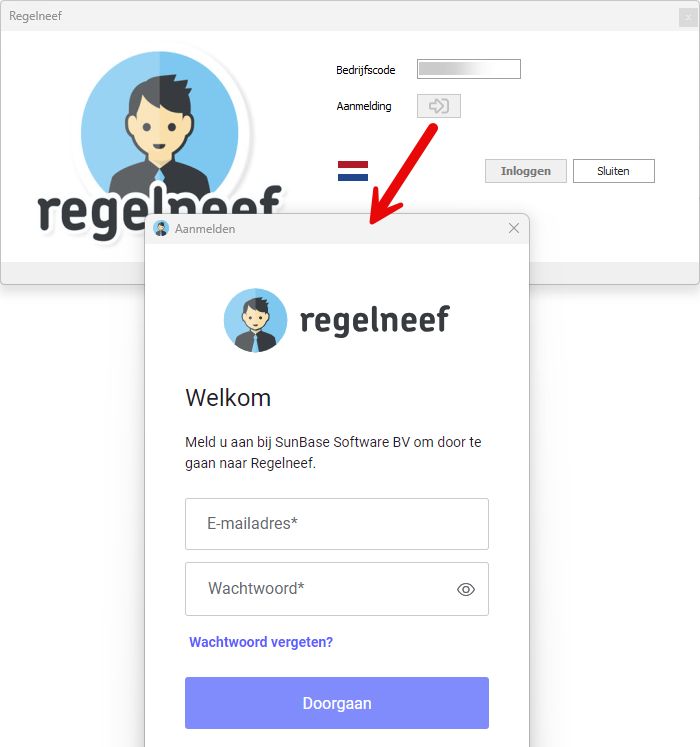
•The sign-in page opens automatically from the Windows application's login screen.
•Sign in with your email and password. Your email address then appears in the login screen.
•The Log in button becomes available to start the session.
New options
•If you signed in recently on this system, the sign-in page closes immediately and your previously verified email appears automatically.
•If your email grants access to several Regelneef databases, you do not have to sign in separately for each database after the first.
•The sign-in page is web-based, offering convenient options for filling in its fields.
•Forgot password lets users request a reset email and set a new password themselves.
Extended accommodation rental contracts
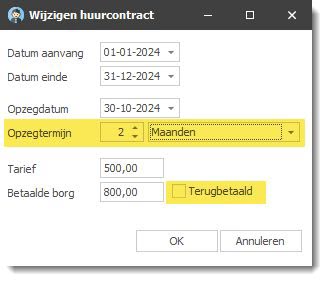
Two new fields are available:
•Notice period
•Deposit refunded
These are also available as columns in the accommodation overview and planlist.
Date-column filters
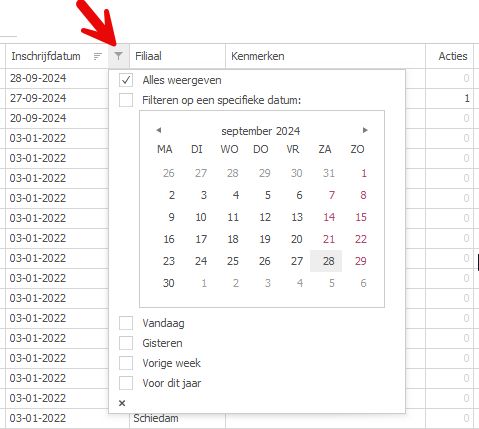
Every date column available through list definitions now shows a filter button when you hover over its heading.
It opens a date filter with a calendar for selecting a date or range. Depending on the dates in the column, shortcuts such as Last month, Last week and Today are also available.
Scan distributor
An Active column has been added to the employee list.
24.3.1 28 August 2024 |
Log in with an email address
A new login system is coming. This version takes the first step by replacing usernames with email addresses.
Setting your login email address
After logging in with your old username, enter the email address you want to use from now on. It replaces the old login name.
An email address is suggested. Check that it meets the requirements and change it if needed.
•It must be your personal email address
•You must be able to read its inbox
Do not use a shared address such as info@company.com. Use your personal company address or, for example, your personal Gmail address.
If you access several Regelneef databases, you can use the same email address in each. These will later be combined into one account with one password.
24.3.0 6 July 2024 |
New phone-number menu with WhatsApp
Phone fields in several screens now have a menu button offering:
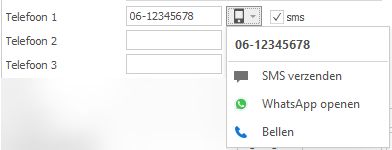
•Send SMS
Opens Regelneef's SMS screen. Available only with the SMS module.
•Open WhatsApp
Opens a chat in WhatsApp for Windows if installed and the number is registered with WhatsApp.
•Call
Starts a call through Windows VoIP software. Available only when enabled under Maintenance → Settings → General.
Import Inbox API
Employee import files can now be sent to Regelneef through an API. Open them in the import screen for checking and processing.
For example, import details submitted through a website registration form.
Actions
Regelneef's action system offers many improvements for quickly recording scheduled tasks and notes for yourself or others. Users can easily see each other's actions, and changes update in real time for everyone. Lists and details screens can now show outstanding action counts per record.
New action categories also support central action lists for different specialisms in your organisation.
New action buttons for employees, clients, accommodations and more
Employee, client, car, accommodation, request and intermediary details now have two new buttons:

Their functions are:
•Create a new action
The left button creates an action directly.
Previously these screens only supported actions through contact notes. Creating a linked action is now much quicker.
•Outstanding action count
The right button shows all outstanding actions for the record, across all recipients.
•Open action-list popup
The right button opens the action list for the record, such as the employee.
All actions are shown initially. Click Action recipient to filter directly to your own actions.
Clear Only outstanding actions to see the history, including completed actions.
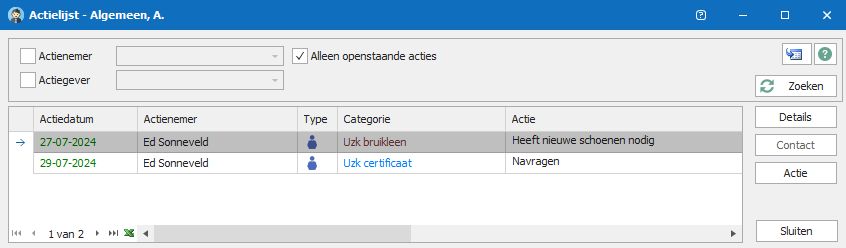
New action properties

•Type and Details button
oAction details show an icon for the linked record type, such as an employee.
oDetails opens the linked record directly from the action.
•Category
oCategories group actions by subject, useful when handling several actions of a particular type.
▪Employee actions can have categories such as transport, accommodation, certificates and identification.
▪Client and general actions have different categories.
oCategories appear in New actions and as a sortable, filterable action-list column.
oYou can add or edit categories to suit your organisation.
▪Use Maintenance → Tables → Action categories.
▪Each category can have its own colour in New actions and the action list, making groups easier to recognise. The default is black.
Action counts in lists
Outstanding actions for a record, such as an employee, can be shown as a column through list definitions. The count matches the button in the record's details screen.
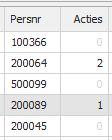
Many lists and planlists have separate columns for different record types. The accommodation planlist, for example, has employee-action and accommodation-action counts.
Real-time updates
Button counts, columns and open action lists update immediately when you or another user makes a change.
Action information therefore remains current even if a screen stays open.
Create actions for multiple employees
Several screens now let you create an action for each selected employee at once. The option Enter action for employees appears in submenus of the employee overview, planlist and planboard.
A button in the entry screen shows the number of employees. Click it to see their names.

Actions - miscellaneous
•After entry, a brief confirmation shows the number of actions created.
•Action-system icons have been revised.
•Action lists can now be filtered by who sent the action.
•Integration of actions into the Regelneef app is under development.
•Improved contact/action screens:
oThe action list below a contact now shows the full text instead of a single line.
oDrag the splitter to resize the lower action area.
Other changes
Regelneef app
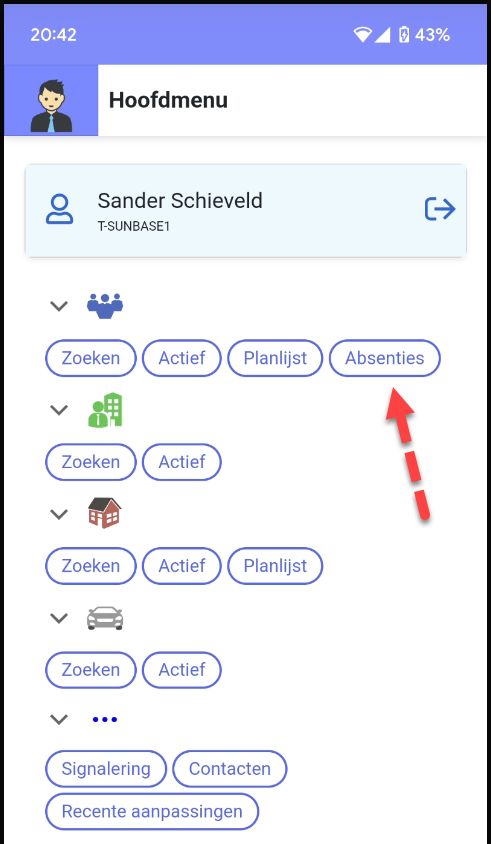
•The Absence planlist is now accessible through Absences in the main menu.
•Car damage is now shown. View linked documents or upload additional ones.
Subcontractor screen and Excel lists
The subcontractor overview now supports custom list definitions, and an Excel button provides Excel lists using these definitions.
Weeksheet subcontractor name and registration checks
Weeksheets now show the placement's subcontractor. You can check its Chamber of Commerce and VAT numbers directly if entered.
Search/refresh button
The Search button found on many screens now has a refresh icon:

This makes it easier to find and highlights that it also refreshes the screen with the latest data.
Extended Intermediary table
•New fields:
oChamber of Commerce number with check, registration copy, documents and issue date
oVAT number with check, VAT evidence and documents
oInsured
oCreditor number, G-account and G-account percentage
oContract start and end dates
•The intermediary table is now directly accessible from the toolbar

Miscellaneous
•The Weekly list per employee tab has a new Account manager column.
•The Properties merge code was missing for some document types. Fixed.
•Copying or taking over a placement no longer copies these checkboxes and dates:
- Order confirmation signed
- Agreement signed
- Initial check completed
They do not necessarily apply to the new placement.
•Employee selection by postal-code radius has been optimised for speed.
24.2 25 March 2024 |
Ending an existing session
Users can have only one Windows application session at a time. If you forget to close Regelneef on one computer, you must end that session before logging in elsewhere.
Regelneef can now do this automatically. If a session is already open, it asks whether to stop the old session on the next login attempt.
Forgetting to close Regelneef on another computer therefore no longer prevents login.
Regelneef API: request list
This new API lets external applications connect to a Regelneef database. It can be enabled per component. The first component is the request list: retrieve current open requests through a URL, for example to display vacancies on a website.
See here for details.
This replaces the old system of automatically uploading an XML request file through FTP.
Regelneef app: adding documents
App version 2.1 lets you add photos and other documents to an archive. Each archive has a button for selecting documents or gallery images. Rename documents after adding them if required.
Placement dates
Three date fields have been added alongside existing checkboxes to support NEN audits:
•Order confirmation signed by client on
•Agreement signed by employee on
•Initial check completed on
These dates are also available in planlist columns and merged documents.
Weeksheets: absence display
A red triangle now appears in a day-column heading if an absence exists that day. Hover over it for details.
Other planning date in accommodation, car and loan-item planlists
These planlists now include an Other planning selection date, initially today. It determines which other planning details, such as job placements, accommodation and car use, are shown.
For example, in the accommodation planlist:
•Period dates select the accommodation-use records
•Other planning selects the date for job placement, absence and car-use details in the columns.
Client contacts: selecting a contact person
Copy normally inserts the correspondence contact, but another person from the client's contact list may be needed.
You can now select from the client's contacts in the contact-name field.
Longer employee address
The employee address field now allows 60 instead of 30 characters, accommodating longer addresses such as those in Portugal.
Scan distributor: copying files
The scan distributor previously focused on moving files to archives. The new Copy button works the same way but leaves source files in place.
For a file needed in two archives, copy it to the first, then move it to the second.
Regelneef downloads
Maintenance now includes Regelneef downloads, opening a page with links to the Windows installer and the app stores.
App-store QR codes let you open those links with your phone's camera.
Miscellaneous
•Several countries restrict SMS sent by software. A solution is being rolled out for Denmark, Finland, France, Norway, Romania, Czechia and the United Kingdom.
For these countries, the sender specified in Regelneef is replaced by a general name. Include your sender name in the message itself.
•The Self-employed field for employees and placements is now available as a merge code in the various layout types.
•The client's Twitter field has been renamed X.
•New fields/columns:
oEmployee planlist: Absence start date, Absence end date
24.1 11 December 2023 |
Car damage
You can now record damage for cars.
Car details have a new Damage tab.
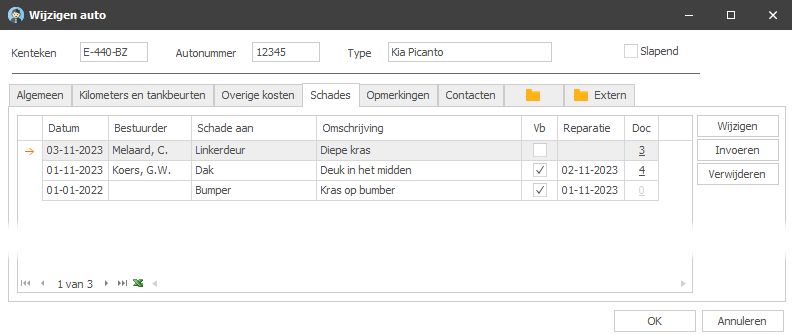
A damage record includes:
•Damage date
•Driver
•Damage to
•Description
•Recoverable yes/no
•Repair date
•Documents, such as photos
Driver
A button retrieves the driver on the damage date automatically. If several drivers are found, choose the correct one.
Documents
Link several documents to each damage entry. The list shows their count; double-click it to open the documents directly.
Current damage on handover forms
Damage merge codes are available for car-use documents. Include them in handover layouts to list unrepaired damage automatically: entries without a repair date.
Updated Regelneef app
Version 2 of the app is coming with a new look and feel.
We plan to add more features during the coming year. The app has been redesigned and modernised to provide a fresh foundation.
Version 2 is in testing and is expected in January 2024 through App Store and Play Store updates.
Would you like early access and to give feedback? We are looking for testers; email info@sunbase.nl.
Protecting GDPR-sensitive details
From app version 2, certain employee details, such as passport number and BSN, are hidden by default.
A new setting under Maintenance → Settings → Security controls this.
To allow these details for non-administrators, their user-level permissions must also permit it.
English-version improvements
Lists
Fields previously showing Dutch yes/no values are now translated in screen and Excel lists, as are Driver, Passenger and gender.
Documents
Language-dependent values such as yes/no and gender can now be translated when merging documents.
The login language may differ from the desired document language. Set a central preference under Maintenance → Settings → Language: Dutch, English or the logged-in user's language.
i2o integration for BI dashboards
i2o builds Business Intelligence dashboards for sectors including flexible staffing. They combine multiple data sources to provide insight into different aspects of a business.
An API integration now lets Regelneef data feed such dashboards automatically.
See i2o's article about its collaboration with SunBase and the result for one of our clients.
Miscellaneous
•Excel document merging now supports existing macro-enabled workbooks (.xlsm).
•New fields/columns:
oEmployee planlist: Registration date, Driving licence expiry, Contract start date, BIC, Payment account holder
oAccommodation planlist: Affiliate code, Capacity, Maximum capacity, Absence start date, Absence end date
oAccommodation documents: Number of days