Automatically translated from Dutch. Some wording may be inaccurate.
7.6.0 3 December 2015
2015 redesign
Regelneef underwent a major redesign this year.
Its internal software structure has been extensively revised and modernised to support new ways of using Regelneef in future versions, including a cloud service. The cloud will also provide the basis for mobile Regelneef applications to access and edit selected data.
Most internal changes are not visible, but the opportunity has been taken to improve efficiency where possible. The employee planlist is one example in this version.
The changes delivered alongside the redesign are described below.
Employee planlist
FASTER
The planlist brings together a large amount of data, which could make the old implementation slow. Data retrieval has been substantially redesigned for greater efficiency. This improves:
•Opening the planlist (*)
•Refreshing after editing a placement or searching again
(*) The first time a particular window opens in Regelneef is always somewhat slower than subsequent openings.
Calculating placement overtime rates
Selecting a placement rate can also copy overtime percentages. The corresponding amounts are now filled in automatically too.
Fewer messages to dismiss
Red notifications when saving planning details now appear as a balloon at the bottom right that disappears automatically.
Weeksheets
•Settings for generating weeksheets from the planlist have been clarified.
•Refreshing a weeksheet from its placement is now more complete and also recalculates wage component totals.
•Weeksheet remarks are now available as an employee planlist column.
Import modules
After importing one employee, Regelneef offers to open the employee immediately so you can add further details.
Editing an import row's details now automatically revalidates it, so resolved import issues disappear immediately.
Employee, client and hours imports now fully support multiple users, each running their own import.
Other changes
File archive with Dropbox, OneDrive, etc.
File paths can now depend on the Windows username. Regelneef replaces {WINUSER} in a path with that username at runtime. This is useful for synchronised Dropbox or OneDrive folders, for example using c:\users\{WINUSER}\DropBox as the central path.
Find clients by debtor number
A search field has been added to select clients by all or part of their debtor number.
More efficient employee and client details
Tab data, such as placements and contacts, is now loaded when the tab is opened instead of when the details window opens. This speeds up startup.
Edit SMS recipients directly
Recipients can now be edited directly in list cells instead of opening a separate details window.
Employee language skills
Language skills display and editing now use less space and work in the same way as in requests.
Export data from the document layout window
The layout window now exports the underlying merge data to Excel in a simple fixed format. Use:
[Show maintenance options →] Export data
•This provides a clear view of all available merge data.
•It is also useful for using the data as a table in another application. It is not an Excel layout system; the output format is fixed.
Concurrent user count
A user could previously remain listed as active after Regelneef was not closed correctly and the user did not log in again.
These usage records are now cleared automatically when the user is no longer active.
New list definition columns
Employee planlist and planboard:
•Client collective labour agreement
•Collective labour agreement wage
•Place of birth
•Weeksheet remarks, in the planlist only
Accommodation planlist:
•City of the current placement's client
Other changes
•Accommodation bank account numbers now support longer IBANs.
•Maintenance → Tables → VAT codes can now be controlled correctly through permissions.
•Some requests could not be merged into documents. This has been fixed.
7.6.1 11 December 2015
Weeksheet
Changes to wage component quantities were sometimes not saved. This has been fixed.
Actions
Action list: the action date colour could change while moving between rows. Edit action: OK now closes the window even if nothing was changed.
Planboard
Employee planboard Excel export now works correctly when the definition includes weeksheet details.
7.4.0 19 March 2015
CLA
Placement agreement details
Placements now have CLA and Collective labour agreement wage fields. Hours is now a free-entry field instead of a fixed list.
There are now four agreement-related placement fields:
1 – Apply client's collective labour agreement (yes/no)
2 – Collective labour agreement
A list of agreements linked to the client
3 – Hours per week
A free-entry field filled automatically by the selected agreement, but overridable for the placement
4 – Collective labour agreement wage
The minimum gross wage for this placement under the agreement. If the actual wage is lower, Regelneef shows a red warning and prevents saving.
Collective labour agreements table
Hours per week is now a free-entry field rather than a fixed list.
Contract phase improvements
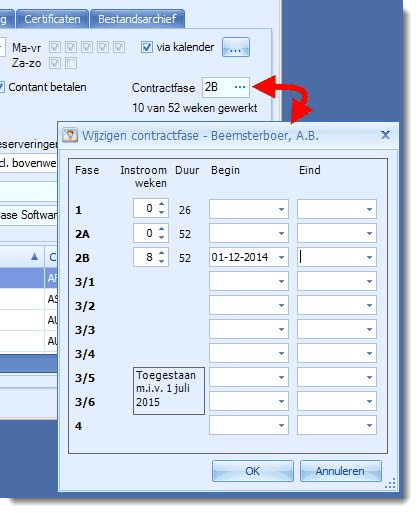
Employee contract period details have moved from General 2 to a separate window, opened from the General tab by clicking the new field displaying the current contract phase.
The new contract phase window includes these changes:
•For phases based on weeks worked, you can now record prior weeks already worked in that phase, for example at another agency. These are included in the total weeks worked.
•The maximum permitted weeks worked is now also shown for relevant phases.
•Dates for NBBU phases 3/5 and 3/6 have been added. These phases are permitted from 1 July 2015, as indicated in the window.
Automatic count of weeks worked
Based on weeksheet hours, Regelneef now automatically counts weeks worked for relevant phases: NBBU 1, 2A and 2B, and ABU A. On the employee's General tab, the contract phase then also shows weeks worked and the maximum allowed.
Weeks worked are calculated as:
•Weeks with at least one billable weeksheet hour since the phase started;
•Plus any prior weeks entered for that phase.
Phase status in lists
The employee overview and employee planlist have a new Phase status column showing weeks worked and the permitted maximum. For phases without week counting, it shows the current phase end date if recorded.
Contract phase alerts based on weeks worked
The existing Contract end date alert is unchanged. A second alert, Contract phase end, applies to phases based on weeks worked. Its default 28-day look-ahead is treated as four weeks, so an employee with four working weeks remaining appears in Alerts.
Employee overview
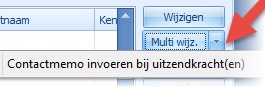
Add a contact memo to multiple employees
Previously available in the employee planlist, this option is now also in the Multi-edit drop-down menu in the employee overview.
Calendar availability from the employee overview
These options make calendar availability easier to edit:
•A new Calendar availability column shows whether calendar registration is enabled.
•You can double-click this column. If it says Yes, the availability window opens directly instead of employee details.
Hired-in staff man-day statements
Revenue and margins in man-day statements
This module originally showed the cost of hired-in staff in a week, based on weeksheets and hourly wages, broken down by hour type.
It now also shows revenue based on client rates and the difference between revenue and costs. Revenue is broken down by hour type, with merge fields for total costs, revenue and margin per subcontractor.
Some merge fields have been renamed for clarity. Existing layouts have been updated automatically.
Two example layouts using the new features are in the Reports subfolder of the Regelneef program folder:
•layout Mandagenstaat Inleen - Margelijst ZZP.doc
•layout Mandagenstaat Inleen - Inkooporder ZZP.doc
Other changes
Lowercase letters in ID numbers
ID and passport numbers are no longer automatically converted to uppercase because newer ID cards can contain lowercase letters.
Intermediary country
You can now record an intermediary's country.
Accommodation planlist and planboard
Rate and rate period from the accommodation placement are now available as columns.
Week number calculation
Some dates were incorrectly assigned week 53 instead of week 1. This has been fixed, and existing weeksheets starting 29 December 2014 have been corrected to week 1.
Other changes
•Excel client lists sorted by client name could fail with SQL Server 2012/2014. This has been fixed.
•Searching for employees with combinations of certificates did not always work correctly. This has been fixed.
7.4.2 3 April 2015
When New a placement, the CLA selection list could produce an error. This has been fixed.
7.4.1 2 April 2015
The weeks-worked calculation was sometimes incorrect. This has been fixed.
An Agreement hours per week column has been added to employee planlist and planboard definitions.