Automatically translated from Dutch. Some wording may be inaccurate.
7.2.0 13 November 2014
Requests
New request fields
Requests now also support:
•Education
•Properties
•Levels
These correspond to employee details and are now included in matching.
Improved request entry
Certificates and languages previously took up considerable space. They are now displayed and edited on one line; double-click to open the selection list. The same applies to education, properties and levels.
Individual items in these new subtable fields can be removed using Delete or Backspace.
Search by order number
The request overview now has a search field for all or part of an order number.
Remarks in lists
Remarks can now be displayed as a screen column through list definitions. Hover over a cell to read the full text of a multiline remark.
Link between evaluations and placements
Evaluations are now linked to the placements from which they were created. This allows the employee planlist to show the latest evaluation for a placement and to create or open evaluations for a group.
This is useful where an evaluation is required for particular placements. The planlist now shows the status and lets you edit the evaluations.
Employee planlist
•New list definition columns: Evaluation entry date and Evaluation date.
•New Evaluations button with Open evaluations and Add evaluations menu options.
•Use Open evaluations to open the evaluation window filtered to the relevant placements.
•Use Add evaluations to create evaluations for a group of placements. If a placement already has an outstanding evaluation, a message appears and no duplicate is created.
Evaluation overview
•New Placement button opens the evaluation's underlying placement.
•New Placements selection field focuses on one or more placements. It is filled automatically when opening evaluations from the employee planlist and identifies placements by number.
•New list definition column: Placement number. This shows the unique underlying placement number, also available in the employee planlist.
Employee details, Placements tab
•New list definition columns: Evaluation entry date and Evaluation date.
•New Evaluations button with Open evaluations and Add evaluations menu options.
Filter evaluations by affiliate
The evaluation window now has the standard affiliate list, restricting evaluations when the user lacks access to an employee's affiliate.
Filter screen lists with Ctrl+F
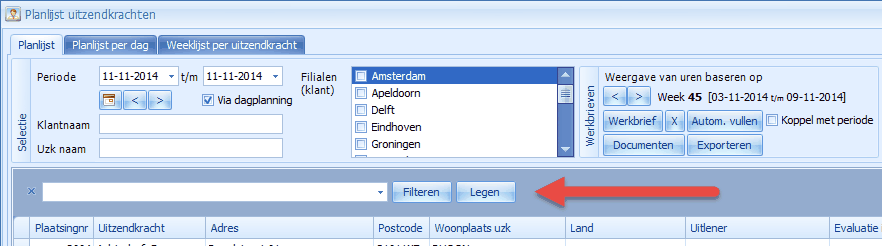
You can search across all visible columns in any screen list. Click the list, for example the employee planlist, and press Ctrl+F. A search field appears above it. Results update as you type, with matching text highlighted in yellow.
Employee and hours imports
Employee import now includes certificates, subcontractor and discipline
These fields have been added to employee import, initially for Excel. See the separate help page in the documentation.
Hours import with automatic overtime calculation
Hours import now has extended settings for automatically determining overtime types, described under Import hours.
Placements
Edit multiple employees from planning
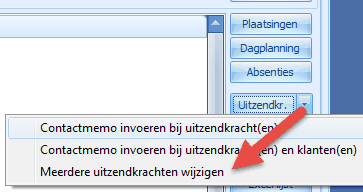
You can now open Edit multiple employees from the menu beside the Employees button in the employee planlist and planboard.
Block new placements for selected absence types
Under Employees → Tables → Absence types, specify whether a type blocks new placements. Normally, overlapping absences produce a blue warning that can be ignored. Selecting Block new placements for an absence type turns the warning red and prevents saving the placement.
Open employee from placement details
A new Open button at the bottom opens employee details.
IBAN validation
Employee IBANs are now validated automatically. Invalid numbers are rejected.
Accommodation placement remarks
Accommodation placements now have a Placement remarks field available in screen and Excel lists for the accommodation planlist and planboard.
Employee details
The Accom tab now shows remarks. An Accommodation button has also been added to open accommodation details directly.
Link subcontractors to affiliates
Subcontractors can now optionally be assigned an affiliate, and the subcontractor overview has an affiliate selector. Visibility follows employee affiliate permissions, allowing users to see only subcontractors for their own affiliate, for example.
The affiliate also affects subcontractor file folders, allowing separate folders per affiliate as described under File archive.
Other improvements
Faster Excel export
Excel export is faster again, by around 40% for larger lists.
Postcode radius searches
Search radii of 75 and 100 kilometres are now available. These larger searches may take a few seconds.
Collapse file folders except the root
Under Maintenance → Settings → File archive, select Never collapse the root folder. This is useful when recent files are in the root and historical files are in subfolders: automatic or manual collapsing then leaves the root open.
Select own affiliate in affiliate lists
This setting is now configured per user. It has moved from Maintenance → Settings to user details under Maintenance → Users and takes effect at the next login.
Show an action again in New actions using N
Press N in the action list to show an unfinished action again in New actions. This is useful when processing actions mainly from that window.
Calendar availability by default
Settings → Employees now lets new employees default to Via calendar for availability.
Hidden disciplines
Disciplines no longer used but retained for historical records can now be hidden by marking them hidden. Select Include hidden to show them. Add the Hidden column through list definitions.
Hidden client levels
Client levels now support hidden status to hide older levels by default.
Affiliates table
All entry fields are now also shown as columns for a clearer overview.
Nationalities table
Nationality descriptions have increased from 20 to 40 characters.
New columns available through list definitions:
•Evaluations: Placement number
•Request overview: Remarks screen column
•Employee overview: Hidden screen column
•Client overview: Certificates
•Employee planlist: Evaluation date
•Employee planlist: Evaluation entry date
•Employee planlist, Weekly planlist per employee tab: working times
•Accommodation planlist: Placement remarks
•Accommodation planboard: Placement remarks
•Goods planlist: Current placement discipline
•Disciplines table: Hidden
Fixes
•Affiliate selection on the Weekly list per employee tab did not work correctly. This has been fixed.
•Employee overview postcode selection now also applies to the Excel list.
7.0.0 10 March 2014
Excel lists directly to PDF or email
PDF support, email integration and selected records
Excel lists previously always opened from a temporary location. This remains possible, with additional options now shown when you click Excel, for example in the planlist:
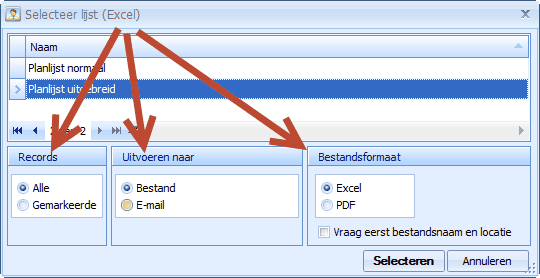
Alongside selecting an Excel layout, you can now:
•Use only selected records
•Create an email with the file attached
•Convert the Excel list to PDF
Practical example:
To email a client a PDF of scheduled employees, select that client's rows in the planlist, click Excel list and choose Selected records, Email output and PDF format.
Regelneef then lists email addresses relevant to those records, including employees, client and client contacts. In the example below, the contact person is selected.
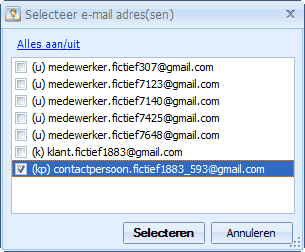
Regelneef creates an email to the client contact with a PDF listing the five employees.
This feature is available in employee, car, accommodation, goods and absence planlists and planboards.
Documents to email
Merged documents could already be attached to email. You can now select the recipient directly in the layout window. Multiple available addresses appear in a checkbox list when Output to is set to Email. The following
example shows addresses relevant to a placement: employee (u), client (k) and contact person (kp). 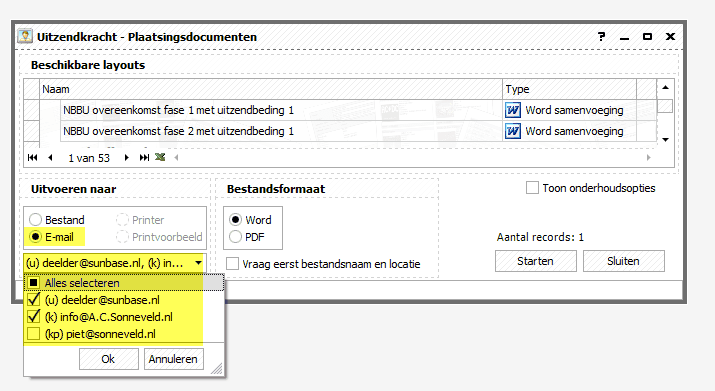
Employees
Employee availability
You can now record exactly which days an employee is available using fields at the top right of General. Two methods are supported:
•By weekday
The default method, with separate checkboxes for Monday to Sunday.
•Via calendar
A button opens a calendar where you can select any combination of periods and individual days.
Saving a placement or day planning produces a warning if a scheduled day conflicts with employee availability.
The employee overview now has an Available checkbox, filtering employees available on the selected date through weekday or calendar settings.
Select Calendar registration to find everyone whose availability is recorded through the calendar, for example to contact them for updated availability.
Maintenance → Settings can default the employee overview to Available employees.
Automatic uppercase fields
These employee fields now automatically convert input to uppercase:
•ID card / Passport
•Bank account number
•BIC
Edit absences from the employee planlist
The new Absences button adds, edits or deletes absences for one or more selected employees together.
Refresh weeksheets and more flexible overtime percentages
Refresh a weeksheet
You can now refresh a weeksheet from its placement without deleting it first.
If an extra overtime percentage or wage component is needed after creating a weeksheet, add it to the placement. Then choose Save, refresh weeksheet and reopen from the weeksheet OK button menu. Regelneef attempts to preserve entered hours and component quantities; check them after refreshing.
Note: hours can only be preserved for weeksheets created with Regelneef 6.8.2 or later. A warning appears for older weeksheets.
Overtime and allowance order in weeksheets and exports
Up and down buttons now let you reorder overtime and allowance rows in a placement.
New weeksheets use this order instead of sorting automatically by wage percentage, giving you control over the displayed sequence.
The chosen order also applies when refreshing a weeksheet.
Freepack assignment and weeksheet exports now use percentage rows in placement order.
Other changes
Microsoft .NET Framework 4.0
Regelneef now uses .NET Framework 4.0 to support newer software developments. It supports Windows XP and later.
Regelneef 6.6.x and 6.8 show under Help → About Regelneef whether the framework is installed and provide a download link if needed: http://www.microsoft.com/nl-nl/download/details.aspx?id=17113. Framework 4.5, standard on Windows 8, is also suitable.
Find clients by postcode radius
The client overview now supports selecting clients within a radius of a postcode.
Subcontractors on the toolbar
The subcontractors table is accessible from the toolbar.
New colour themes
Several themes have been added, bringing the total to 21, including Office 2013 styles, the minimal Whiteprint theme and Dark Style.
Freepack export
•Client export now includes Chamber of Commerce number, website and VAT code.
•Employee IBAN export now also includes BIC.
Other changes
•Placement documents now support the aanvraag_certificaten merge field.
•Employee or client import cells could become unreadable with certain themes. This has been fixed.
•An empty result row could appear while adding a client. This has been fixed.
•At Freepack's request, placement export format has changed to prevent potential import issues for assignments sharing a start date.
•UBPlus export now includes Account holder, which can be mapped in the UBPlus import definition.
•Employee Active/Passive status was sometimes incorrect in absence, goods, accommodation and car planlists. This has been fixed.
•Opening the weekly planlist per employee could fail in specific cases. This has been fixed.
•When creating backdated placements, Regelneef did not always fill P for dates before today. This has been corrected.
•Client multi-edit now correctly updates Type.