Automatically translated from Dutch. Some wording may be inaccurate.
8.4.0 4 December 2017
New module: Statistics
File → Statistics opens a new module that charts data over a period you specify. Moving to the previous or next period updates the chart immediately.
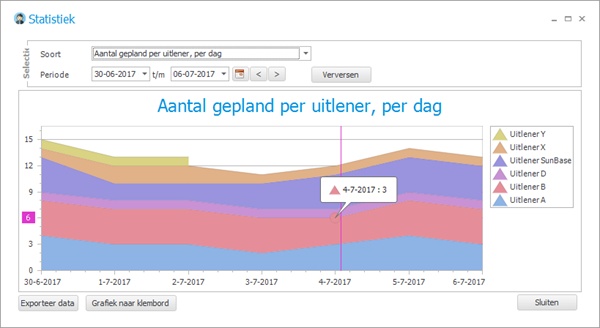
More statistics will be added in later versions. These planning-related options are currently available:
•Client contacts by type, per week
•Scheduled employees per client, per day
•Employees requested per request, per day
•Scheduled employees per subcontractor, per day
Copy the chart to the clipboard as an image for use elsewhere.
Export the data to Excel.
Calling from Regelneef
If you use computer-based VoIP such as KPN ÉÉN or Hipin, you can now dial directly from Regelneef. A button beside phone fields, next to SMS, calls the number with one click.
Enable this centrally on the General tab under Maintenance → Settings.
Day planning: copying and planning ahead
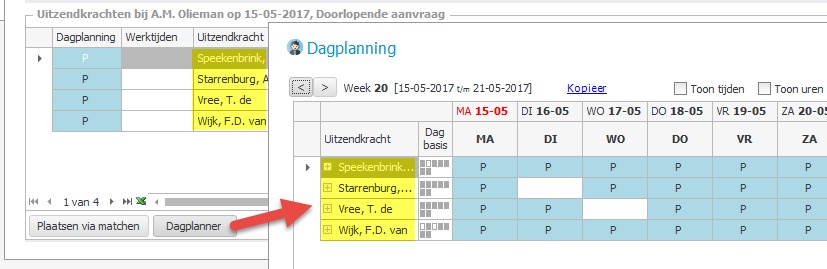
Day planning lets you edit individual workdays within a placement, optionally including working times and hours. This module has been substantially improved internally, with new ways to copy planning by week or day.
Copy by week
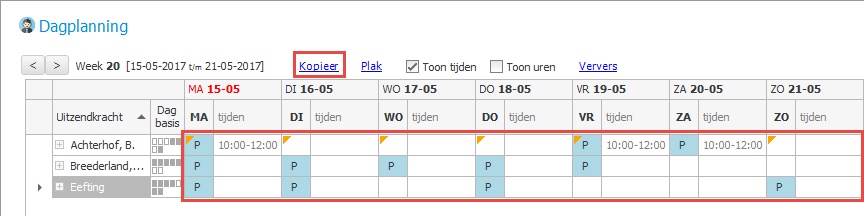
The new Copy link stores planning details for the relevant placements, ready to paste into another week. For example, move to the next week and click Paste.
Copy by day
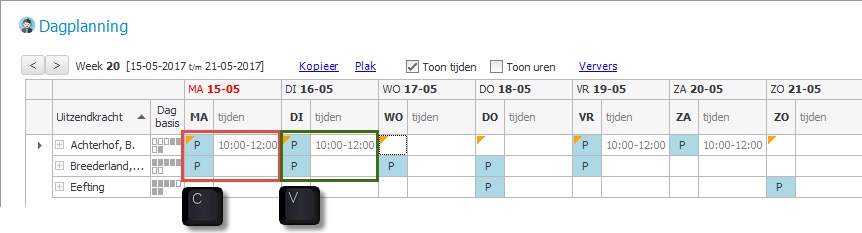
You can also copy a day for multiple placements using C to copy and V to paste. In the example below, C was pressed in Monday's column and V in Tuesday's.
Employee planboard
Day planner now opens all placements in the displayed daily list so you can edit the whole group directly.
Employees
Easyflex integration
 The first steps towards Easyflex integration have been completed. You can now use Import employees to refresh employee details from Easyflex. This connects directly to the Easyflex data service, without export files.
The Regelneef Financial administrations table now has a field for the relevant Easyflex administration's web service key.
Employee import can retrieve active employees from one administration, optionally limited to those changed since a particular date.
Employee QR codes on more documents
The following document types now support QR codes identifying the employee and document type:
•Car use
•Accommodation use
•Absence
•Goods
Other import changes
•If a certificate number exceeds 20 characters, the rightmost part is used.
•In the details window, the discipline can now also be selected from the underlying table.
Clients
New Known through field
This records how a client or prospect came into contact with your company. Its supporting table is maintained under Clients → Tables.
The field is available in client overview lists and in Multi-edit to update several clients at once.
Add contacts to multiple clients
You can now add a contact entry to several clients at once through:
•Client overview, in the Multi-edit button menu
•Employee planlist, in the Client button menu
Search by phone number
Client overview phone searches now include all numbers in contact persons and contacts.
Requests
New contact type field
Request contacts can now be assigned a contact type from a selection list.
Use this, for example, to distinguish client contacts from recruitment contacts.
Maintain the new table under Clients → Tables → Request contact types.
The Candidates tab now also shows the employee's affiliate.
Cars
Mileage and refuelling: differences and totals
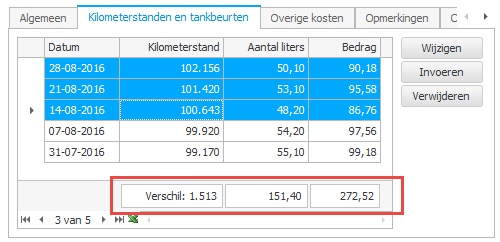
This car tab now has a totals row and supports selecting multiple rows. The totals show:
•The difference between the highest and lowest mileage in the selected rows
•Total litres, limited to selected rows when several are selected
•Total refuelling cost, limited to selected rows when several are selected
Greenstar integration
 Greenstar (greenstarcar.com) monitors driving behaviour to help improve it. A new integration exports Regelneef car use to Greenstar, identifying who drove each car at each time so statistics can be personalised.
Other changes
Import hours from Nitea Work-IT
Regelneef can now import hours from Nitea Work-IT, used by many vegetable, plant and flower growers.
Select accommodations by postcode
The accommodation overview now supports postcode and radius selection, as already available for clients and employees.
Other fixes and improvements
•New overview columns:
Employee planlist / planboard: street, house number, suffix and phones 1, 2 and 3
Employee overview: initials, street, house number and suffix
Accommodation planlist: contract start, contract end, cancellation date and deposit paid
•Placement export to Freepack assignments:
- Now respects the employee's Pay out reserves setting.
- Includes employee number as well as BSN.
•Toolbar buttons now display consistently across colour themes.
•Sorting amount or hours columns did not always work in the cloud version. This has been fixed.
•Additional employee check date alerts now respect the selected affiliates.
•New passwords entered through Change password no longer have a maximum length restriction.
•Pasting files from Outlook could fail when file names contained certain special characters. This has been fixed.
8.2.0 5 May 2017
Additional employee check dates
You can now record important employee dates for Alerts to flag when due, for example transition payment or pension dates.
The employee's General tab has a new Additional check dates button. It opens the recorded dates and their types; the type is also displayed in Alerts.
Click New to enter a date and choose its type from Check date types. Maintain that table under Employees → Tables → Check date types.
Scan distributor: automatic archiving with QR codes
|
Regelneef now offers a quick, reliable way to archive scanned documents such as signed agreements. |

Automatic archiving
The scan distributor's Auto-archive button checks selected files for valid QR codes and shows the results. Recognised codes identify the employee and the destination file name in their archive. Click Archive to move the files to the correct locations.
PDF splitter
Automatic archiving assumes each document is a separate PDF. Scanning many documents together saves time but produces one PDF containing documents for different employees. Regelneef can split this into separate files.
Click Split in the scan distributor to analyse the combined PDF. A list of recognised documents appears, and one click performs the split.
The resulting files are added to the scan distributor list. Regelneef immediately asks whether to start automatic archiving to move them into the correct archives.
QR code in a merge layout
The scanned file must contain a QR code on its first page, added when Regelneef creates the document. A special Word merge field is available for general employee and placement documents. Regelneef draws the QR code at that field during merging.
Document codes
A QR code also contains information determining the archived file name. The new Document codes table under Employees → Tables maps the code to the destination name, including subfolders if needed.
To set the document code in the layout, right-click the QR merge field and choose Edit field.
Goods alerts
Goods expiry alerts
You can now record an expiry date and a certificate number for an item. This identifies when it becomes invalid and may need reinspection or removal from use.
Alerts now flag items expiring within 30 days. The period is configurable as usual.
The new fields are available as columns in the goods planlist.
Alerts with current placement and subcontractor details
For employee alerts, it is useful to see where the employee currently works. Three new columns are available through list definitions:
•Client name of current placement
•Location of current placement
•Request description of current placement
A new Subcontractor column shows the employee's current subcontractor.
Disable birthday alerts
To exclude birthdays completely, set both the Before and After alert periods to -1.
Longer alert period
The maximum number of days to look ahead or back has increased from 370 to 500.
Employee import
Excel certificate import by certificate name
Certificate column headings no longer need a code; they now use the certificate's name.
Use the exact certificate description followed by ' nr' or ' geldigtot'. For a VVA-1 certificate, for example, use these columns for number and expiry date:
•VVA-1 nr
•VVA-1 geldigtot
Excel import supports formulas
Cells containing formulas are now supported.
Excel import from another worksheet
You can now import from a worksheet other than the first. If a worksheet is named regelneef, Regelneef reads that sheet instead.
Employee import: new fields
The following fields have been added:
•Driving licence number and expiry date
•Residence permit and expiry date
•Health insurance and policy number
•Gross wage
•Alternative address: street, house number, suffix, postcode, city and country
•Bank details: IBAN, BIC, account holder and account holder city
See the Excel specification for the complete list of import column names.
Other import changes
•Employee import now checks extreme dates before processing to prevent later import errors.
•Excel import now recognises column headings with trailing spaces.
•Freepack option 161 employee import now reads the alternative address fields added in Freepack 17.06.
Employee overview
Certificate screen columns
Certificates can now be displayed directly in employee overview results. Previously available in Excel lists, these columns are now also available in screen list definitions.
Employee XML export now includes certificates
XML exports now include all certificate numbers and dates, making XML an even more useful employee data exchange format. The XML export (specification) can also include archive files.
Clearer selection tabs
The two tabs containing selection fields are now named Selection 1 and Selection 2.
Search by country
Selection 2 now includes a country search field. Enter part of a country name to search both the employee's normal and alternative addresses.
Placement discipline based on the employee's discipline
A new setting automatically fills the placement discipline from the employee's discipline.
The employee should have only one selection discipline; otherwise the first is used. When placing a group, each employee receives their own discipline unless you explicitly fill in the placement Discipline field, which then applies to everyone.
With this setting enabled, placing against a request does not copy the request's discipline to the placement.
Find this setting on the Planlist tab under Maintenance → Settings.
Other changes
Requests: new fields and publication permission
Two new fields:
•Hours per week;
•Industry, selected from a table. The client's industry is copied automatically when creating a request.
A separate user-level permission now controls whether a user can change Release for publication. This allows one person to be responsible for reviewing and releasing vacancies to the website.
Digital signing: download as ZIP
The signing report is important to retain alongside the signed document, but storing two separate files can be inconvenient.
A new checkbox combines both files into a ZIP when downloading, so they can be archived under one name.
Also:
•A .doc file is now automatically converted to PDF before sending, preserving the layout more accurately in SignRequest.
•Both the signed document and report are selected by default when opening downloads.
Excel export
The Excel button in these windows now opens the extended dialog with email and PDF options:
•Employee overview
•Client overview
•Alerts
SQL query for cloud databases
SQL query is now available to cloud database users.
Configurable default client type
New entries in the client overview default to Client. You can now change this under Maintenance → Settings → Clients, for example to default to Prospect.
Export worked hours to Loon
Weeksheet export now supports Loon, exporting all normal worked hours.
Employee export also supports Loon, exporting general employee details for import into Loon.
Other fixes and improvements
•After adding or importing a cloud layout, the layout list now always refreshes when the upload finishes.
•Employee import no longer sets the account type if the imported account number is empty.
•Request contacts now also show the affiliate of the user who entered them.
•A required field on the employee's General 2 tab could incorrectly be reported as empty when saving. This has been fixed.
•The Open dialog for Excel employee import now lists recent files.
•Electronic signing now clearly reports if a file is still in use and cannot be sent.
•The outdated term Sofi number has been replaced by BSN wherever possible.
•The daily planlist tab now determines day-specific absence information more accurately.
•Placement export once again shows employee names and numbers.
•Placement export to Loon (Roos & Roos) has been improved.
•Employee certificates must now have unique names, checked on entry.
•The maximum base folder path length has increased from 100 to 200 characters.
•Manually selecting a request from a placement now also copies its location if the placement location is empty.
•Read-only permissions now also apply to file folder rename and delete buttons.
•The employee planboard sometimes showed an empty client row when everyone was scheduled against requests. This has been fixed.