Automatically translated from Dutch. Some wording may be inaccurate.
8.8.0 1 December 2018
Day planning in the planlist
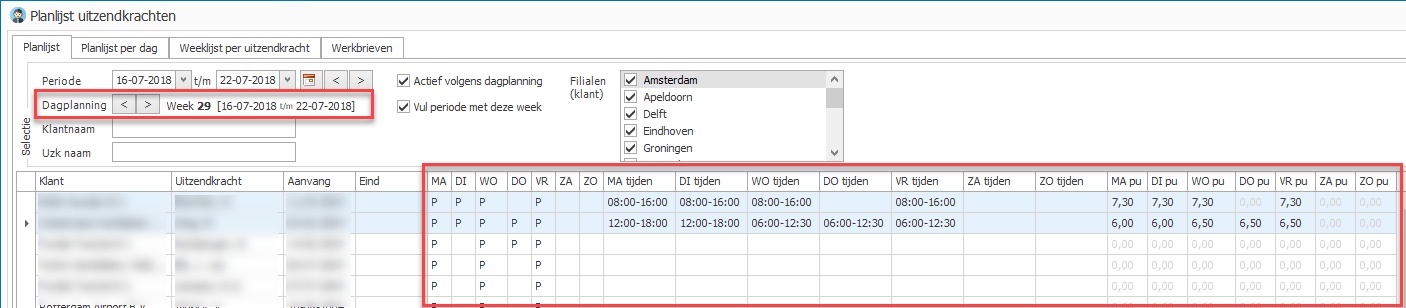
You can now display day columns in the planlist.
These Monday-to-Sunday columns can show all details recorded in day planning:
•Scheduled (P)
•Working times
•Planned hours
Use list definitions to choose which of these 21 columns to display and in which order.
Day planning information always refers to one week: the day planning week. When the planlist opens, it defaults to the current week. Change the week in the selection fields to refresh the data automatically.
Weeksheets in the planlist: a separate tab
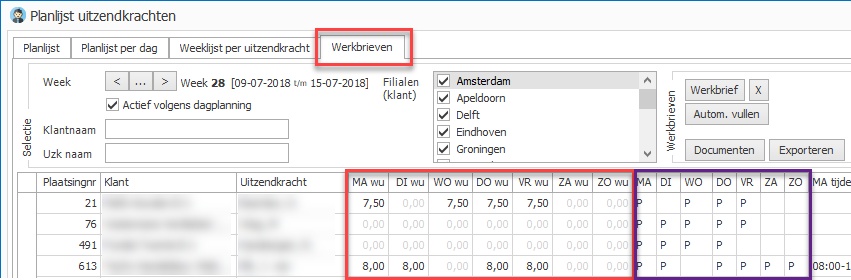
The planlist view with weeksheet hours and the buttons for weeksheet actions has moved to a separate Weeksheets tab in the planlist.
This tab defaults to the previous week, which determines the placements, weeksheets and day planning shown. Selecting another week updates all of these.
The new day planning columns described above are also available on this Weeksheets tab, shown in the purple area in the image.
Existing screen and Excel list definitions have been copied from the regular planlist to the weeksheet planlist. Weeksheet columns were then removed from the regular planlist definitions because that data is no longer available there.
Accommodations
Accommodation overview: occupancy percentage
|
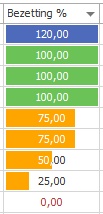
The accommodation overview now offers an occupancy percentage column based on the date at the top left.
The percentage is also displayed as a progress bar, making it easier to spot the most underoccupied accommodations.
It is based on the accommodation's normal capacity.
Add the column using the accommodation overview list definition. |
Actual occupancy over a period
The accommodation planlist has a new Period occupancy column showing actual occupancy for each accommodation over the selected period.
Country
You can now record a country for an accommodation and display it in lists and documents.
Accommodation planboard
Weeks are displayed slightly wider so larger numbers are immediately visible.
Other changes
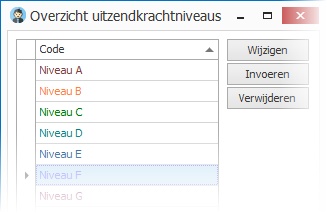
Employee levels in colour
You can now assign a colour to each employee level. Lists displaying the level column use these colours.
Email clients
The email button in the client overview now has an option to email only correspondence contacts.
The email function has also been made more robust for very large client selections.
Scan distributor
The scan distributor now supports intermediaries and goods.
•Startup has been optimised, and its menu icon has changed.
•QR code recognition has been improved further.
•Automatic archiving now accepts a document without an employee number if the employee has since been assigned a number in the database.
Editable account types table
This previously fixed table can now be maintained. Account types can also be made hidden or deleted.
See Employees → Tables → Account types.
Goods
•An In use by button in item details opens the employee currently using the item.
This is useful, for example, when an item appears in Alerts and you need to view its user.
•The Number and Certificate columns in the overview are wider.
•The Number field has increased from 10 to 20 characters.
•Goods alerts now also show the item number as an identifier.
Employee registration retention period
A six-month option has been added to this central setting.
SFTP support for request exports
In addition to FTP, Regelneef now supports SFTP (SSH File Transfer Protocol). The settings explain how to use it.
Other changes
Other changes
•Nitea hours import now works correctly in the cloud version.
•An issue copying a user level has been fixed.
•Sorting by age did not always work correctly in some lists. This has been fixed.
•Saving availability through the calendar is much faster.
•An issue entering evaluations from a placement has been fixed.
•Employee planboard: absence counts no longer include unscheduled placements.
•The number of certificate types Regelneef supports has increased.
•Day counts on employee tabs now show zero rather than one for a future start date without an end date.
•The client's Known through field can now be made mandatory.
•New available columns:
oAccommodation planlist / planboard: subcontractor and account manager of the current placement's client
oCar planlist / planboard: subcontractor and account manager of the current placement's client
oAbsence planlist: Last active
oEmployee overview: Registered by and current placement discipline
oAccommodation planlist: employee email
8.6.0 8 June 2018
Changes for the GDPR
Applicant status and alerts
Under the GDPR, it is important to monitor registered applicants because their data can only be retained for a limited period. A Applicant checkbox has therefore been added to employees, with these related changes:
•A checkbox in the employee overview selects all applicants at once.
•Multi-edit in the employee overview can update Applicant for several employees.
•A Registrant column is available in the employee overview.
•A notification appears when placing someone still marked as a applicant.
•The existing field identifying the registering user has been renamed Registered by.
Mark employees without placements as applicants
A new option marks everyone as a applicant if they have never been placed according to the system and are neither hidden nor blocked.
It is available on the Handy tab under Maintenance → Settings.
Applicant alerts
Alerts now flag applicants registered four weeks ago. This period can be configured if you routinely obtain consent to retain data for one year or the maximum of two years. Set it centrally on the Alerts tab under Maintenance → Settings.
Employee last active date
Regelneef now automatically tracks the last date on which an employee is or was active, taking day planning within placements into account.
You can display this in the employee overview using the Last active date list definition column.
The last active date is relevant to the GDPR. Once someone is inactive, retention is limited. The employee overview can select people last active up to a specified date, and an alert has also been added.
Retention alerts for inactive employees
New alerts based on Last active flag three points:
Inactive retention period |
Years after last active date |
A |
2 |
B |
5 |
C |
7 |
Search by BSN
Searching by BSN is not permitted under the new privacy rules and has therefore been removed.
Merge documents with Excel
Regelneef can now fill in existing Excel documents.
Why
Exporting data to a new Excel file was already possible. You can now also write data into an existing Excel file, enabling options such as:
•Automatically filling in third-party Excel documents, such as registration forms.
•Complete freedom over the Excel layout and presentation.
•Using Excel formulas, charts and pivot tables. Your own Excel cost calculation, for example, can now be populated directly by Regelneef.
How to use it
This is part of the layout system available through Documents in many places.
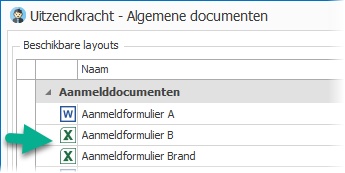
The layout window can now contain Excel documents as well as Word documents. Click Start to write the selected data to the Excel file. Emailing, PDF conversion and electronic signing are also available for merged Excel documents.
How to maintain it
Select Show maintenance options in the layout window. Click New and choose Excel. The Merge definition button opens a window where you specify which data goes into which cells. Its operation is described here. Save with OK, then select the Excel (.xlsx) layout file when prompted. Use Import to replace that file later.
It works similarly to Word merging, with these differences:
•Merge instructions are held in a separate definition rather than embedded in the file as Word merge fields. This is useful for third-party files: replace the file with a newer version while retaining the merge definition.
•When merging multiple records, the data repeats as rows in the Excel file. The whole file is not repeated per record as with Word documents.
The layout window now shows the icon at the far left for a clearer display.
Availability
Excel merging is available in most places that support Word merging.
More flexible evaluations
Evaluations can now be created from an employee as well as a placement. This is useful for companies recording evaluations without placements in the system.
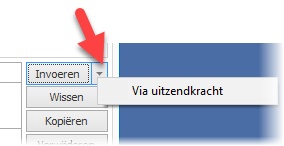
Use the new drop-down menu beside New to enter via employee. The employee selection window also supports selecting several employees.
Editable client, discipline and location
For evaluations created this way, enter the client and discipline normally copied from a placement. These columns now provide selection lists based on your typed text. The location column is also editable.
These fields can also be edited in evaluations created from placements.
Entry from a placement
After creating an evaluation from a placement, Regelneef now asks whether to open evaluations for the selected placements.
Edit a document before attaching it to email
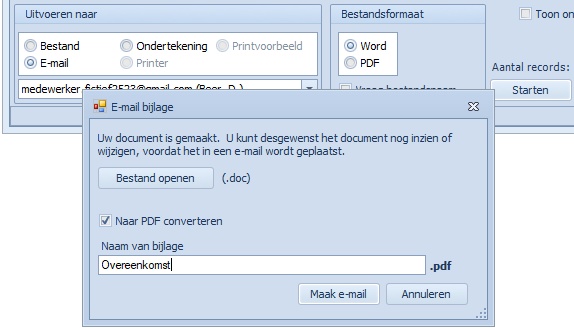
When generating a Word layout for email, Regelneef now offers additional options:
•Open and optionally edit the generated document first.
•Change the attachment file name.
Copy weeksheets
You can now create weeksheets for a group of placements from the planlist, using hours from an existing weeksheet of your choice.
Normal hours, overtime, surcharge hours and time-off-in-lieu reservation are copied.
For overtime and surcharge hours, the corresponding wage and rate percentages must exist in the destination placement. A message appears if they do not.
Planning is respected: hours are not copied to days on which the employee is not scheduled.
Use this option in the employee planlist through Fill automatically in the Weeksheets area.
Other changes
Delete multiple employees
Delete in the employee overview now supports multiple selected records. If a deleted employee still has a file folder, this is reported afterwards.
Delete electronic signature requests
You can now delete multiple signature requests at once.
Internet update documentation
Internet update updates local, non-cloud Regelneef installations. A new link provides details of the latest changes and appears when a new version is available.
LinkedIn button
Regelneef news is also available on LinkedIn. A button has been added beside Twitter and Facebook. Follow these channels to stay informed.
Proposal overview
A Client button has been added to open the relevant client details directly.
Import employee contact memo
Employee import now accepts longer text as a contact memo, providing a flexible way to import additional information.
Excel list format: XLSX
All Excel list output now uses .xlsx automatically.
Log
The new Maintenance → Log option shows information about background processes, such as events from automatic integrations. Particular actions, such as deleting a client, will also be logged in future.
ABU phase adjustment
Since November 2017, ABU phase B has six periods instead of eight. B-7 and B-8 have been removed and are no longer shown. Employees still in B-7 or B-8 have been moved to phase C by this update.
To check whether any employees were in B-7 or B-8, open Maintenance → Log, optionally select the update period and click Search. Any affected employees are listed in ABU_FASE messages.
Car taxable benefit
You can record a car's taxable benefit percentage. It is also available in the car planlist and planboard.
List definitions
•Screen and Excel list definition details are easier to widen.
•Certificate name changes now correctly update employee and planlist definitions.
•Added to all planlists and planboards: PESEL number.
•Added to the absence planlist: Languages and Disciplines.
•Added to the goods planlist: Subcontractor.
•Many columns previously available only for Excel are now also available in employee overview screen lists.
These columns are:
Initials, Surname prefix, Surname, Country of birth, Place of birth, Country, Alternative country, File folder, Account type, Account holder, Account holder city, BIC code, Cash payment, Contract phase start, Contract phase end, File location, Email, Payroll tax credit, Net allowance, Passport valid until, Passport number, PESEL number, Driving licence, Driving licence valid until, Driving licence number, Phone 1, Phone 2, Phone 3, Allowance wage, Residence permit, Residence permit valid until, Health insurer, Policy number and Languages.
Other changes
•Employee multi-edit: Registration reason has been added.
•User levels: filters make it easier to find permissions by part of their name.
•Hired-in staff man-day statements: a new merge field outputs total hours.
•Cloud version: buttons opening employee details now prevent duplicate windows caused by double-clicking.
•The pending signature request overview no longer slows down with large numbers of requests.
•An error opening weeksheet documents from the planlist has been fixed.
•Discipline names can now contain up to 60 characters.
•Alerts no longer check certificates for hidden subcontractors.
•Certain employee contract phase dates were missing from merge fields. This has been fixed.
•When generating multiple documents, a header from one document can no longer continue into the next.
•Statistics tooltips now provide more information to clarify which data they describe.