Automatically translated from Dutch. Some wording may be inaccurate.
20.5 12 November 2020 |
Change log
Recording user changes
Changes to several important tables are now logged, allowing you to review their history later.
The following is recorded:
•Change type:
oAdding a record
oEditing a record, including exactly which fields changed
oDeleting a record
•Table
•User
•Date and time
•Key details identifying the record
Cloud-based
The Regelneef cloud service records the log entries, so they include changes from both Regelneef for Windows and the Regelneef apps.
The change log is not available for a local, non-cloud installation. Its buttons are disabled in that case.
Features
•The log, including the names of changed fields, is also fully available in English.
•Logging started in October 2020; changes before that date are not available.
•Use the filter row to filter multiple columns. For example, find changes by a particular user to an employee's placements, optionally narrowed to a specific field.
•No one can edit the log itself.
Employee and client records
This version logs employees, clients and directly related tables such as contacts, placements, accommodation use and certificates.
Viewing the log
•Each details window that supports logging has a button to view changes to that specific record.
•From employee details, you can retrieve changes from all logged underlying tables in one list. The button also has a submenu for changes to a particular table, such as the employee's placements. Client details offer a similar submenu.

Other changes
.NET Framework update
Regelneef now uses Microsoft .NET Framework 4.7.2.
Most computers will already have this version. If the new version does not start, install the framework; version 4.8 is also suitable. See Microsoft's downloads.
Actions for multiple users
•An action created for several users is now marked complete for everyone when one recipient completes it. By default, it is treated as a group action that ends once one person completes it.
•To require separate completion, select Individual completion when creating an action for multiple users. This checkbox appears automatically when several recipients are selected.
Weeksheet: invoice numbers and time-off-in-lieu reservation
•Two new fields record invoice numbers:
oPurchase invoice number, only visible for hired-in placements
oSales invoice number
•Both fields are also available in weeksheet lists, making it clear whether incoming and outgoing invoicing is complete.
•A new button calculates the time-off-in-lieu reservation from the premium portion of overtime and surcharge hours. The result appears directly in the relevant field.
Placement days in the planlist
The employee planlist now offers a column with the total number of placement days. If no end date is entered, days are counted up to today. This matches the count already shown on an employee's Placements tab.
Other changes
The Weeksheets tab in the employee planlist did not always refresh immediately after editing a weeksheet. This has been fixed.
20.4 3 August 2020 |
Client overview: new contact persons tab
A separate Contact persons tab now shows all contact persons matching the client selection.
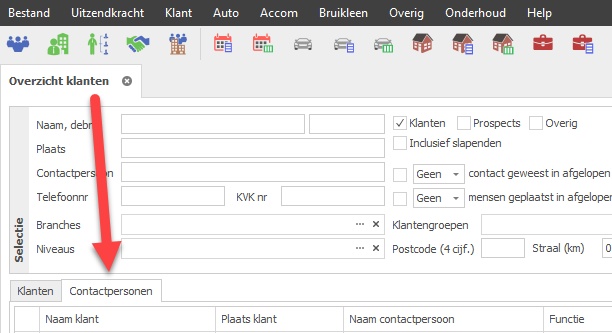
•Contact persons have their own screen and Excel list definitions, which also support all other client fields as columns.
•Email and SMS buttons work with the selected contact persons.
Regelneef app improvements
New main menu
The main menu now provides direct access to relevant lists, such as active employees, active clients and current accommodations.
Result counts
Lists, such as active employees or any other selection, now also show the number of results.
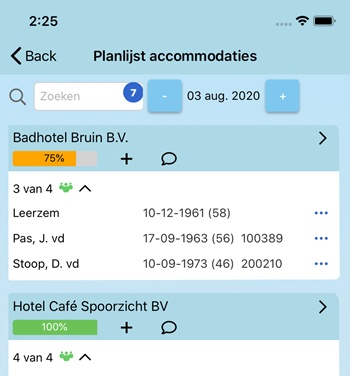
Accommodation planlist
The app's first planlist is now available for accommodations. It lets you:
•View occupancy and the occupants' details directly
•Create or edit accommodation placements
•Send an SMS to everyone in an accommodation
Other changes
•Support has been added for importing the latest Excel formats.
•The issue date of a subcontractor's Chamber of Commerce extract is now available everywhere as a merge field.
•Wage sector and VAT code are now available in placement documents.
•The leasing company is now available in the car planlist.
20.3 3 June 2020 |
Recording self-employment
A checkbox now identifies an employee as self-employed. A corresponding checkbox has also been added to placements.
When placing a self-employed worker, this setting is copied to the placement.
•A Self-employed column is available in the employee overview and planlists.
•You can update the Self-employed field for several employees using multi-edit.
Quickly create a self-employed worker's business as a subcontractor
The Self-employed field appears beside Subcontractor. For a self-employed worker, record their business as a subcontractor so you can, for example, record and check its Chamber of Commerce details.
A new button beside Subcontractor in employee details opens the subcontractor entry window with some employee details already filled in. Confirm with OK to create the subcontractor and link it to the employee immediately.

Distinguishing wages from purchase rates
For an employee with a subcontractor or self-employed status, the Gross wage field actually represents the purchase rate.
The field is now labelled correctly in employee and placement details, depending on whether the employee is hired in.
Editing placements: hired in or not
When adding or editing one or more placements, an indication on the right now makes clear whether they are hired in. If all placements are hired in, Gross wage is labelled Purchase rate.
Tractor driving licence support
Driving licence category T is now supported. You can select it in the employee overview, and support has also been added to imports and document layouts.
Checks when entering a weeksheet
A notification is now shown when entering a weeksheet if:
•The ID document has expired
•The ID document has not yet been checked
•The subcontractor's Chamber of Commerce extract is out of date
Opening tabs from an employee or client
Employee details normally open in a floating window. Opening evaluations or weeksheets from there displays them behind it in a tab, which can be inconvenient on a small screen.
With one monitor, the floating employee window now automatically moves into the tabs before the requested window opens in the next tab.
The same applies when opening placements or weeksheets from a client.
Locking the client code on the login screen
To prevent users changing the login client code, add ClientcodeReadonly=YES to regelneef.ini.
The client code will then be read-only at login.
Passport photo display
Right-click the photo and choose the new Refresh option to retrieve the image again using its name.
Other changes
•When editing placements, column headings for fields that will change now also turn blue.
•A period selector has been added to the SMS archive.
•Some employee planlist columns could not be sorted by clicking them. This has been fixed.
•Buttons are now protected against unwanted double-clicks, preventing actions from running twice.
•Sent SMS messages once again record the affiliate for SMS reporting per affiliate.
•New available columns:
oEmployee planlist / planboard: rate and rate period for the current accommodation
oGoods planlist: Number of days, showing how many days the item is in use during the requested period.
oCar planlist / planboard: intermediary and employee alternative address, postcode, city and country
oCar overview: Remarks
20.2 21 March 2020 |
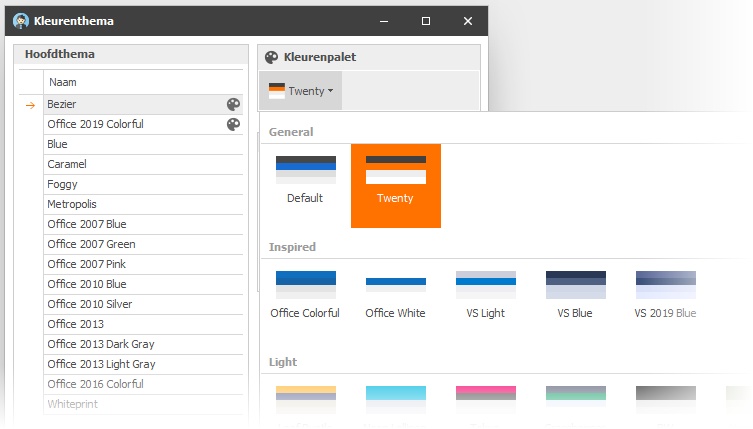
More colour options
Two main themes are now available, each with its own colour palettes. Select a theme on the left to choose a palette from the drop-down list on the right.
- Main theme Bezier: 23 palettes
- Main theme Office 2019 Colorful: 8 palettes
Premium SMS delivery
SMS messages now use a premium delivery service to improve delivery quality.
Action list improvements
•The action list now uses list definitions, so you can configure it to suit your needs.
•An Excel list button has been added, with its content also configurable through list definitions.
•The action list now responds immediately when a search field changes.
•New columns are available:
oAssigned by
oClient name of the current placement, for employee actions
oEmployee selection disciplines
Improved Excel export
The small Excel button below screen lists has been improved. Exported formatting more closely matches the screen, and the header row automatically includes filters.
Second Excel hours import format
A second format (format B) has been added for importing hours from Excel. It supports overtime hours recorded in separate columns.
Candidate count per request
A new overview column shows the total number of candidates for each request.
Additional placement checks
When entering a placement, a notification is now also shown if:
•The ID document has expired
•The employee's subcontractor's Chamber of Commerce extract was issued more than three months ago
Alert on Chamber of Commerce issue date
A Subcontractor Chamber of Commerce issue date alert has been added for extracts approaching three months old, the statutory maximum validity for subcontractors and self-employed workers.
Alert on loan use end date
An end date may be entered when recording use of an item, for example to indicate when it needs replacement. An alert can then be useful.
Enable the new Alert on use end date checkbox in the Good categories table to include all goods of that type in this alert.
Other changes
•Many internal improvements have been made to increase overall stability.
•New Freepack employee export setting: Export alternative address.
•New Code field for users.
•New Code field for affiliates.
•The new signature request window can now be resized to show more of the message text.
•In the external archive, help about adding files now opens only when clicked, rather than automatically.
•An error when refreshing a weeksheet has been fixed.
•XML vacancy uploads have improved error handling.
•You can add recipients to an open SMS window by clicking SMS again from other records. This stopped working correctly in version 20.1, as did similar behaviour in placement and accommodation-use entry windows. This has been fixed.
•Electronic signing now uses the specified document name rather than the uploaded file name.
20.1 27 December 2019 |
Multiple monitors and tabbed windows
Most overview windows now open as tabs in the main window. This makes it clearer which windows are open and easier to switch between them.
Any Regelneef window can now be dragged outside the main window or onto another monitor.
New action notifications are integrated on the right of the main window.
Tabs
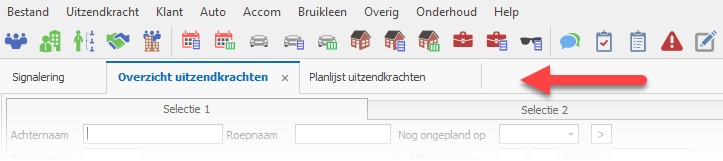
A window can open as a tab or as a floating window. Most overviews benefit from the full available space and therefore open as tabs.
Undocking tabs
Drag a tab away from the tab bar and release it where you want a floating window, on any monitor.
Closing tabs
You can close a tab using:
•The button on the right of the tab
•The tab's right-click menu, which also lets you close all other tabs at once
•The usual Regelneef controls, such as Esc, OK or Close
Moving tabs
Drag tabs left or right to change their order.
Floating windows
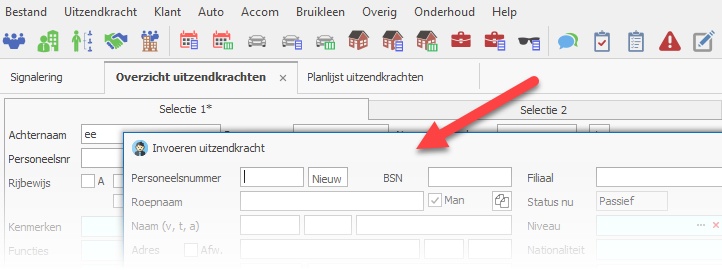
A floating window can be placed on any monitor.
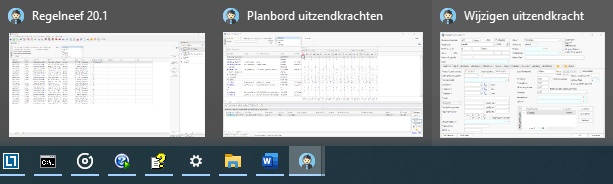
Floating windows are also accessible through the Regelneef icon on the Windows taskbar. Use it to restore a minimised window or to close a floating window.
Drag a floating window back to the tab bar to dock it as a tab again.
New actions
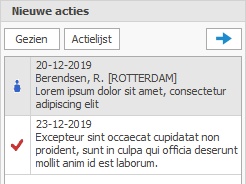
New action notifications now appear in a fixed area on the right of the main window, visible only when there are new actions.
The list disappears when you mark the actions as Seen. Another button hides the list by collapsing it to the right.
It reappears when the new action list changes.
Other changes
•All input fields now use the same font as other components for a more consistent display.
•A new colour theme is available: Office 2019 Colorful.
•You can now configure whether employee searches exclude blocked employees. They are excluded by default.
•An error when importing a Freepack file has been fixed.
•The subcontractor contact person's surname prefix field has been expanded.
•A problem exporting client rates to Excel has been fixed.
•The subcontractor's VAT number is now available as a planlist column.