Automatically translated from Dutch. Some wording may be inaccurate.
19.6 9 November 2019 |
DOCX support in document layouts
Merge to .docx
Word layout merges now always create .docx files instead of .doc files. This often considerably reduces file size.
Layouts themselves can now also use .docx; .doc is no longer required. You can replace existing .doc layouts with .docx versions if desired. Macro-enabled documents (.docm) are also supported.
Convert layouts to .docx
Regelneef provides a tool to convert an existing layout to .docx:
•Select Show maintenance options.
•Select the layout to convert.
•Click Doc > Docx and confirm.
•The new file size appears immediately in the list, and the conversion button is no longer shown for that layout.
Employee import
Drag an import file into Regelneef
You can now drag an import file onto the toolbar to start importing immediately. This can be an XML or Excel file containing one or more newly registered employees, saving several steps.
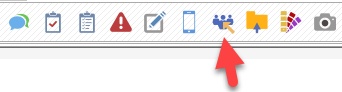
The new Import employees button shown below accepts files dragged from Outlook or File Explorer, for example. If Regelneef recognises a valid import file, it opens and validates it in the import window immediately.
Extended import
Driving licence categories (A, B, BE, etc.) and own transport can now be imported.
Evaluations
•When opening evaluations for one employee from their details window:
oAdding an evaluation automatically filters the placement selection to that employee.
oThe Via employee entry option creates an evaluation for that employee directly, without a selection window.
•The Via employee option was not always available. This has been fixed.
Other changes
•QR code size for all documents can now be set centrally under Maintenance → Settings. Increasing it improves readability.
•Adding, editing or deleting absences from the employee planboard now correctly uses the selected date.
19.5 11 September 2019 |
VAT number check
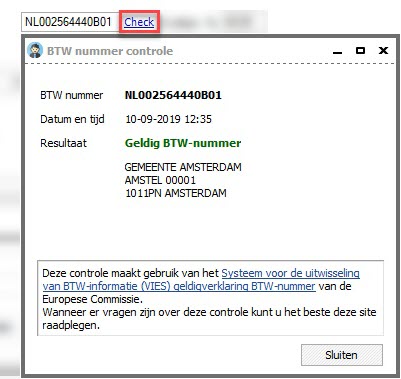
You can now quickly check a client's, subcontractor's or self-employed worker's VAT number. Click Check beside the number to validate it through the European Commission's service.
The result appears immediately. If valid, the registered name and address are also shown unless this information is restricted. You can take a screenshot as evidence of validity at that time.
Accommodation days per week
Regelneef is adding automatic weekly counts. The first available result is the number of accommodation days for an employee in a particular week.
The Accommodation days per week column is now available in:
•Employee planlist, Planlist tab
•Employee planlist, Weeksheets tab
Day planning in placement documents
Day planning could already be displayed in the planlist or exported to Excel using list definitions, but was not available as merge fields for Word or Excel documents.
Placement documents now support all day planning details: P, planned times, planned hours, week number and start date. Regelneef uses the planning week selected in the planlist.
This allows weekly planning, broken down by day, to be exported into a prepared Excel document, for example.
The following merge fields are also available:
•Order confirmation signed by client
•Placement confirmation signed by employee
•Initial check completed
Car tax value
You can now record a company car's tax value.
Search list definition columns
Some windows offer many columns in alphabetical order. A new filter lets you search for part of a column name to find it more easily.
Import employee intermediary
Employee import now supports a column containing the intermediary's name.
Contact overview
A new column can display the contact type.
Other changes
•Changing day planning times through Edit placements did not always work. This has been fixed.
•Evaluations now validate the maximum length of 100 characters to prevent saving problems.
•The nationalities table did not refresh immediately after changes. This has been fixed.
•An issue when using Regelneef in another time zone has been fixed.
•The tab listing a client's requests was sometimes incomplete. This has been fixed.
19.4 14 June 2019 |
Additional check dates for cars and accommodations
You can now record special dates, as for employees, for example to track maintenance.
These dates are included in Alerts. When adding a date to a car or accommodation, specify what it concerns. Configure the choices under
•Cars → Tables → Check date types and
•Accom → Tables → Check date types.
Contacts and actions for intermediaries
The contacts and actions system is now also available for intermediaries.
Actions appear in notifications, and intermediary contacts appear in the contact overview.
Alerts for hidden records
You can now choose whether Alerts checks hidden records. A new checkbox under Maintenance → Settings → Alerts sets the default, which is also shown in the Alerts window.
•Use the checkbox in the Alerts window to switch between including and excluding hidden records.
•Checking hidden records is enabled by default after this update.
•Some employee alerts are always included even for hidden employees: retention period checks and additional check dates.
•The Alerts window now responds immediately when checkboxes change, without requiring a manual refresh.
Copy a signature request
A new Copy button in the signature request overview creates a request based on an existing one. The New signature request window opens with all fields filled in and the original document in PDF format.
This saves time if, for example, the recipient's email address is incorrect. That requires a new request with the correct address, which copying now makes quick to create.
Open subcontractor or intermediary directly
The Subcontractor and Intermediary fields in employee details now have buttons to open the corresponding details directly.
Absences in accommodations
Absence details are now also available as columns in the absence planlist and planboard.
Management reporting
A new Registrations per level, per user option has been added.
Other changes
•Renaming a discipline now immediately updates discipline lists in the various columns.
•Placement matching during hours import has been improved.
19.3 9 May 2019 |
English translation complete
All software components have now been reviewed and adapted so the whole system can be used in English by selecting it at login.
List definitions
Screen and Excel list definitions are used throughout Regelneef and now support English. List maintenance includes an additional English column heading field. Regelneef fills these headings automatically, and you can edit them as needed.
Logging in in English automatically uses English column headings in all windows based on list definitions.
List definition maintenance itself has also been adapted: all available and selected column names are shown in English.
New hours import
The hours import module has been completely redesigned for greater flexibility.
A new flexible Excel import format accepts hours, optionally split into normal hours, overtime and surcharge hours. The module creates new weeksheets from these.
Other changes
•Several planlists load faster.
•The Settings window has a clearer tab structure.
•The PESEL number field has increased to 13 characters.
•An issue with subtables in Excel merge definitions has been fixed.
•Large files now upload correctly to the Regelneef archive over slow connections.
19.2 4 March 2019 |
English translation
|
We have been working for several months to make Regelneef available in English. The work is around 50% complete and will be finished in the coming months. As more users are not native Dutch speakers, the English option is already available so they can benefit from the translated components.
A language flag has been added to the login window. Click it to switch from Dutch to English. |

 We have been working hard for several months now to have Regelneef also work in English. This task is now about 50% complete, and will be completed in the coming months. Since more and more Regelneef users are not native Dutch speakers, we have decided to make the English language choice already available, so that people can already benefit from the parts that have been translated so far.
A flag for the language has been added to the login screen. By clicking on it, the language switches from Dutch to English.
Extended Excel merging
Last year, merging data into an existing Excel document was introduced, for example to fill in Excel forms.
Subtables are now supported, allowing an employee merge to include lists such as courses and certificates.
These improvements also make Excel merging available for:
•Timesheets
•Financial documents
Invoicing
•The weeksheet overview now has a separate Financial documents button for direct access without a submenu.
•Employee number is now available as a merge field in financial documents used to create invoices.
Automatically fill placement VAT code
After selecting a client for a placement, the client's VAT code is copied automatically.
Edit wage components for multiple placements
You can now add or remove a wage component for a list of placements at once. The option is in the menu under the Placements button in the employee planlist.
Other changes
•The employee PESEL number field has increased to 12 characters.
•An error when starting certain reports has been fixed.
•The employee planboard sometimes showed a red cross instead of the daily list. This has been fixed.
•After adding a layout record, the layout file selection prompt did not always appear. This has been fixed.
19.1 17 December 2018 |
New version numbering
Numbering by year
Regelneef version numbers now use the year. The first release for 2019 is version 19.1; the next will be 19.2. Around six updates are planned each year, with the next year's first version released in December.
Regular updates for non-cloud users too
Cloud users already receive automatic updates regularly. For non-cloud users, changes were previously collected and generally released twice a year. This is changing.
Non-cloud users can now also use the current version immediately, without waiting for a major release. Regelneef will notify them when an update is available, around six times a year. Each new version will be announced on the website and through other channels.
Regelneef archive
The cloud version can now store files inside Regelneef itself, in the Regelneef archive.
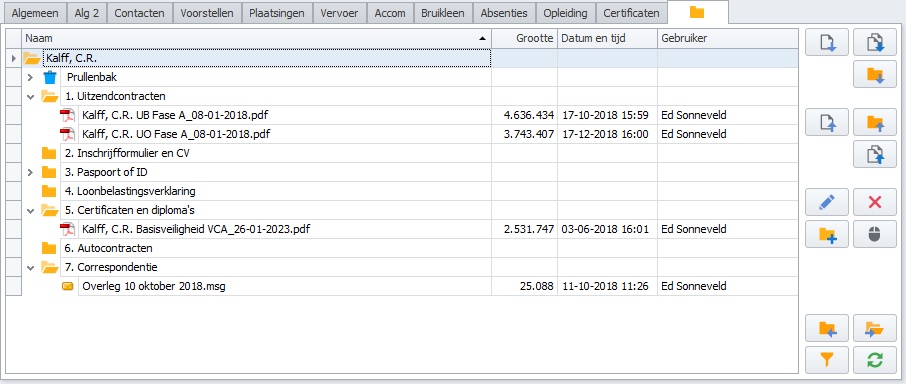
The Regelneef archive is designed as an extended replacement for the existing archive system, which refers to a location on a shared drive.
Regelneef archive features
•Fully integrated central document storage.
•No separate references to shared external or cloud folders.
•Document access is controlled entirely within Regelneef.
•Every record automatically has an archive for documents.
This covers employees, clients, accommodations, cars, subcontractors, intermediaries and goods.
•Works with all Regelneef features, including the scan distributor, employee import and viewing several employees' archives together.
•Documents are also accessible in the Regelneef app.
•A conversion tool uploads existing external archive folders.
•Supports convenient ways of adding documents, including dragging and pasting from Outlook.
•Easily create subfolders, including several at once.
•Drag files and folders within an archive.
•Recycle bin.
•Records which user uploaded or deleted a document.
•Detailed user permissions, separately for documents, folders and the recycle bin.
Existing cloud clients can use the Regelneef archive at no extra cost up to 10 GB. A small monthly surcharge applies above that. Contact SunBase for details.
File archive renamed External archive
To distinguish it from the new Regelneef archive, the existing file system is now called External archive.
The File archive tab now looks as follows:

Its operation has not changed and will remain the same.