Automatically translated from Dutch. Some wording may be inaccurate.
6.8.0 5 September 2013
Day planning
You can now specify individual working days within a placement, called day planning. Each day can also have working times and expected hours.
This allows a placement period to include non-working days. An employee can have several simultaneous placements and work for different ones on different days. This reduces the number of separate placements and avoids repeatedly entering or copying rates, wages, percentages and wage components.
Day planning changes have been made in these areas:
Day planner
The new day planner module (help) specifies working days, times and hours within a placement. It is available as a tab in placement details or as a separate Day planning window opened from several places.
Add and edit placements
A Day planning tab has been added. Double-click a date column or press Space to enable or disable a day. You can also enter its working times and forecast hours.
Planning is displayed by week. A coloured corner indicates an absence or overlapping daily placement; hover over it for details.
Employee planlist
•A Day planning button lets you edit day planning for several placements together.
•New Day planning tab.
This resembles the planlist but shows one record for each worked day in the requested period. A multi-day selection therefore produces a longer list. Date, Working times and Hours columns show day planning data.
The date-specific rows ensure that details such as car use, accommodation use and goods match that exact day. This is not possible in the regular planlist when selecting several days.
•The employee planlist's Via day planning checkbox can now be configured under Maintenance → Settings.
•Use Fill automatically (Weeksheets) to create weeksheets using day planning hours. See the Weeksheets button for details.
•The employee planlist has a new Link to period checkbox, automatically setting the planlist period to the selected weeksheet week.
•The warning that an employee is still linked to a car or accommodation can now be disabled under Maintenance → Settings → Planlist.
•Placement remarks have increased from 65 to 90 characters.
Employee planboard
•The planboard now works with day planning. The employee details list for a selected day includes an active Day planning column. Double-click a cell to disable that placement for the day. To activate an existing placement that is currently unscheduled, select Include unscheduled placements on this day and double-click its cell.
•
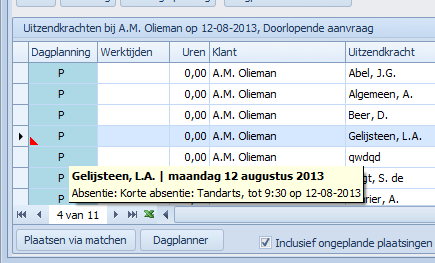
Absence details in the day planning column
•A coloured corner in day planning indicates overlapping placements or absences. Hover over it for details.
•Use the Day planner button to open all placements together and edit the week's day planning.
•Column filters are now available for several client and request columns.
Employee planboard: absences
Absences are no longer automatically deducted from the scheduled count.
Day planning now explicitly records whether someone works on a day. An absence, such as a dental appointment, need not cover the whole day. For a full-day absence, disable the day in day planning. Both Number placed and Number absent then decrease by one.
|
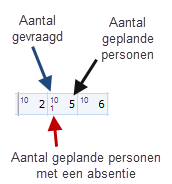
The upper part shows client and request columns on the left and day columns on the right. Day cells show: •Scheduled employees on the right •Employees with an absence at the bottom left •Requested employees at the top left, for requests
In the middle cell of this example, five employees are placed, one with an absence (but still scheduled). Ten were requested, so five more need to be scheduled. |
Employee overview
Availability searches for a date now take day planning into account.
Timesheets
Timesheets also respect day planning. An employee without any scheduled days in the week is omitted even if a placement exists. Clients without any day planning in the selected week are omitted from the first window too.
Weeksheets
•Only scheduled days can be filled in on a weeksheet.
•Generate and fill weeksheets from day planning: Forecast hours recorded in day planning can now be copied into weeksheets using Fill automatically in the employee planlist's Weeksheets area, reducing manual entry.
•The employee planlist has a new Link to period checkbox, automatically setting the planlist period to the selected weeksheet week.
•Weeksheet overview: differences between recorded and invoiced hours and turnover now use red for negative and green for positive values.
•Weeksheets now also display the underlying placement's order number.
Day base for day planning
Each placement can specify its normal working days. The day planner's Day base column shows these days directly.
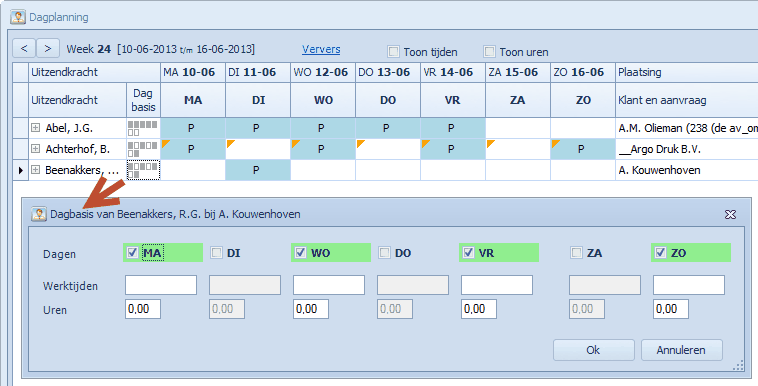
Double-click a Day base cell to set normal working days and optionally times and hours. After confirmation, Regelneef offers to apply them to the rest of the placement. You can still make exceptions afterwards.
Maintenance → Settings determines which weekdays are enabled for new placements, for example to avoid automatically scheduling Sundays.
Employees
Select by postcode radius
The employee overview now accepts the four digits of a Dutch postcode and a radius in kilometres to include nearby postcodes.
Regelneef determines the employee's residential postcode in this order:
1. Accommodation occupied on the selected date
2. Otherwise the alternative address
3. Otherwise the normal address
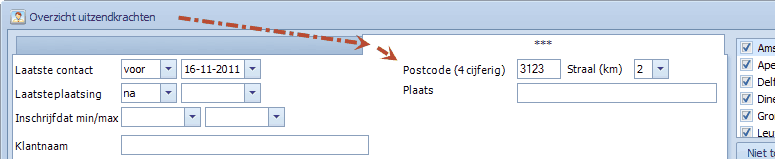
This search field is on the second selection tab. For clarity, selection tabs are now shown along the top rather than the left.
Postcode radius lookup uses an internet service and requires a connection.
Multi-edit
Registration checked can now be updated through multi-edit.
Active placement filter on the Placements tab
The employee's Placements tab has an Active only checkbox to show only currently open placements, useful if they are not all sorted at the top.
IBAN export to Freepack
Employee export now supports Freepack's new IBAN import capability.
Search by file location
A File location field has been added to the second selection tab.
Other changes
Hidden client rates
Rate rows can now be marked hidden, hidden by default but available when viewing rate history.
Requests
Start-date selection has been replaced by period selection. Results include requests overlapping all or part of the selected period.
Subcontractor Chamber of Commerce check
An Open link in subcontractor details opens the entered Chamber of Commerce number on its website for checking.
Unlimited list definition sorting
Screen and Excel list definitions now allow any number of sort levels instead of a maximum of three.
Copy a permission level
You can now copy a permission level to create a similar one. The permission level overview has a new Copy button.
Automatically collapse file folders
For clearer navigation through many files, Maintenance → Settings now lets you specify the file count at which folders open collapsed.
Client entry date
Client entry date is now available in screen lists, Excel lists and documents. Regelneef had already recorded it for several years.
Internet update
The window has been simplified: Check has been removed, and available updates are shown immediately.
Other changes
•The optional EDM check when saving placements has been removed entirely.
•Employee planlist: the Evaluation column can now be filtered.
•Sickness and paid-hours columns were swapped in planlist and weeksheet overviews. This has been fixed.
•Employee property multi-edit did not always work correctly. This has been fixed.
•Reassigning a discipline now also handles disciplines linked to evaluations.
•New actions no longer steal input focus when the New actions window is already open.
•Goods planlist: new Nationality column.
•Employee overview: new Registration checked column.
6.6.0 18 March 2013
Word documents
Multiple records in one Word document
A normal merge repeats the layout once per selected record. Selecting four placements therefore produces four copies of the layout in one document.
Sometimes you need one layout copy containing a list of the selected records, for example one client confirmation listing all scheduled employees. This is now possible.
How it works:
The Edit layout window has a Single document checkbox. Selected layouts are marked EV in the layout list so users can recognise them.
Existing merge fields remain unchanged. Add a repeating section using TableStart and TableEnd fields to display, for example, employee names and BSNs in a client confirmation. These fields are in the merge field list.
Merge record order
When several rows are selected, merged records now follow exactly the same order as the selected rows.
Planboard and placements
End date button
Placement, absence and accommodation-use entry windows now have a button beside End date:
•If the start date is in the past, it sets the end date to today.
•If the start date is today or later, it sets the end date equal to the start date.
•If an end date is already entered, it adds one day.
Certificates in the employee planlist
Each employee certificate is now available in planlist definitions, usually as separate number and expiry-date columns.
Email from planlists and planboards
An Email button has been added beside SMS.
Employee planboard
Automatic daily placements
If placements are always for one day, the end date must equal the start date. A setting under Maintenance → Settings automates this in the planboard.
Edit requested daily counts directly in the planboard
Requested counts could already be entered using Requested per day. You can now edit them directly in planboard cells without opening a separate window.
Use Ctrl with the Up and Down arrow keys to increase or decrease the count by one. Without Ctrl, the arrows move between rows.
This lets you navigate cells normally and hold Ctrl when changing a count.
Requested counts also use a larger, more readable font.
Show new requests on the planboard by default
Maintenance → Settings now determines whether new requests appear as separate planboard rows by default.
Other placement days
Selecting an employee detail row highlights their active days in the upper planboard. These blocks are now red instead of grey for better visibility.
The upper client/request list now includes Affiliate and Branche columns.
Time registration
Weeksheets match the placement period
Days outside the placement period now appear grey in weeksheets.
Clearer hours in employee planlists and weeksheet overviews
Zero amounts now appear grey, making other figures stand out.
Generate weeksheets with standard hours
For employees who usually work a fixed number of hours each day, automatically filled weeksheets save time. You can then correct exceptions individually.
The employee planlist now has a Weeksheets area with a Fill automatically button. Enter hours per worked day, defaulting to eight, and start the action for the selected placements.
Weeksheet: calculated turnover
A new column shows turnover from entered hours. Hourly wage and Rate columns have also been added. Calculated turnover fills automatically and shows a total below.
Weeksheet: actual invoiced hours and turnover
You can now record actual invoiced hours and turnover, with separate columns showing differences from worked hours and calculated turnover.
This is useful for agencies whose large clients largely determine invoiced hours, allowing small differences to be reconciled after invoicing.
To the right of the day columns, weeksheets show:
•Total hours, read-only and already available
•Invoiced hours entered manually
•Hours difference calculated automatically, read-only
•Calculated turnover calculated automatically, read-only
•Invoiced turnover entered manually
•Turnover difference calculated automatically, read-only
These columns are also available in the weeksheet overview.
This registration is disabled by default. Enable it under Maintenance → Settings → Time registration.
Employees
Search employees by email
The employee overview now has an Email field on the second selection tab.
IBAN account number
Employee bank account numbers can now be recorded as IBANs.
Freepack users: IBANs cannot yet be exported to Freepack. Its import module will support them later in 2013.
Evaluations
Several improvements:
•Column headings are taller and wrap evaluation criteria over three lines, allowing narrower columns and more visible criteria.
•The three leftmost columns stay visible when scrolling through many evaluation columns.
•Press Enter after changing the selection period to search immediately.
Employee import
The Regelneef XML format now supports these additional fields:
•Telefoon2
•Telefoon3
•Land
•Geboorteplaats
•Geboorteland
Import through Excel now also supports Geboorteland.
Other changes
Requests: multiple selection
Select several records before clicking Documents to generate documents for all of them.
Accommodation: water supplier
You can now record an accommodation's water supplier using a table prefilled with current providers. Maintain it under Accommodations → Tables. The field is also available in accommodation lists.
Goods: file archive
The file folder system is now available for goods. Enable it under Maintenance → Settings → File archive.
Alerts
The Only check employees active in the past month option now also applies to subcontractor certificates. Only subcontractors involved in a placement during that month are then checked.
WinSalar export
•Standard days per week, hours per week and hours per day are included.
•Gross wage is filled as the period wage.
Other changes
•Excel client imports could duplicate contact persons. This has been fixed.
•Copying placements did not correctly include percentages and allowances. This has been fixed.
•Proposal overview: Maintenance → Settings now configures defaults for Include inactive proposals, Include inactive requests and Show only each proposal's final status.
•Employee documents have a new uzk_verblijfadres merge field.
•Employee planlist permissions now correctly apply to Request and Archive buttons.
•Copying requests now also includes the description, planboard setting and certificates.
•When multiple Excel reports are available, the selection list is now alphabetical.
•New placement document merge field: plaatsing_looncomponenten_alleenloon
•New employee overview screen column: Registration reason
•Proposal overview: new request start and end date columns
•Requests: the Prospect column was not determined correctly. This has been fixed.